> ## Documentation Index
> Fetch the complete documentation index at: https://docs.jitra.app/llms.txt
> Use this file to discover all available pages before exploring further.
# Understanding Jitra Subscriptions
> A Jitra subscription combines the plan, Object quota, storage retention, Integration level, Fleet option, billing period, and charges.
A Jitra subscription combines the plan, Object quota, storage retention, Integration level, Fleet option, billing period, and charges.
## What to Check
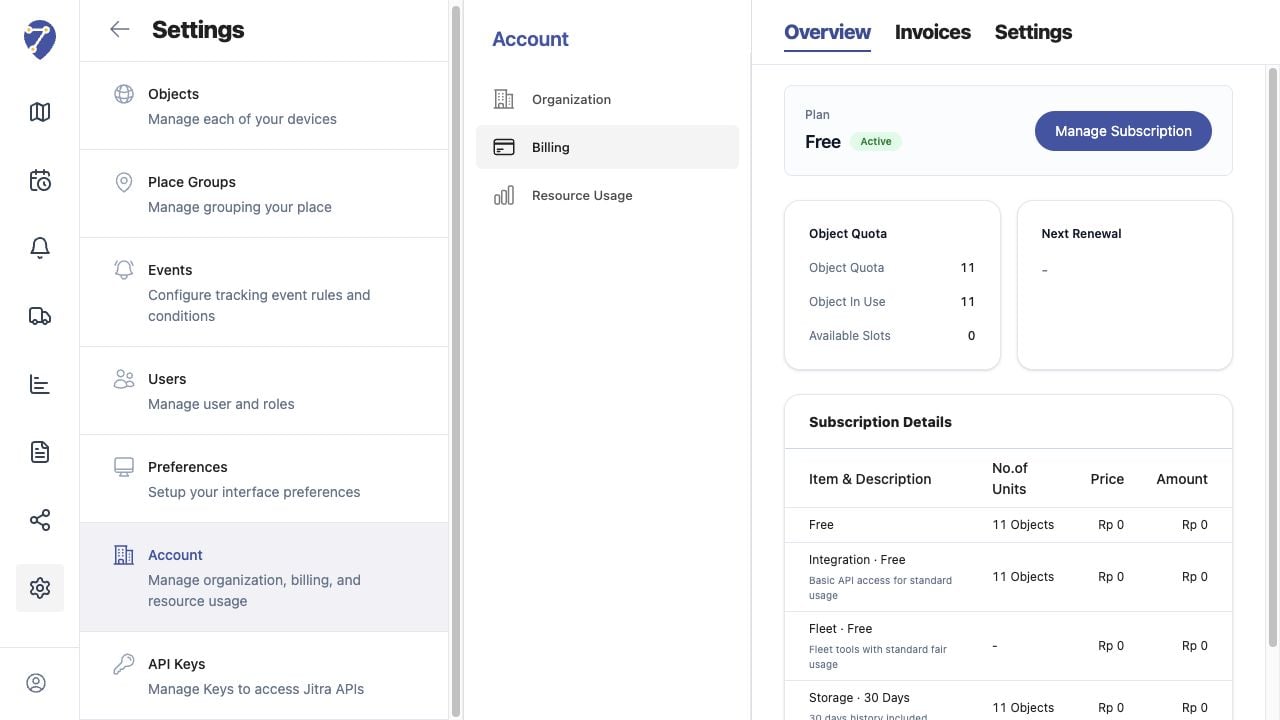
* Current Plan and status
* Object Quota, Object In Use, and Available Slots
* Next Renewal and estimated bill
* Subscription Details and tax information
## Current Jitra Workflow
Open Settings > Account > Billing > Overview to review the active subscription.
 ## Reviewing the Result
Confirm the saved or displayed information matches the intended Object, users, period, and Organization workflow.
## If the Issue Continues
Review required fields, access permissions, available data, and Organization limits. Contact an Organization administrator or Jitra support when the required control is unavailable.
## Reviewing the Result
Confirm the saved or displayed information matches the intended Object, users, period, and Organization workflow.
## If the Issue Continues
Review required fields, access permissions, available data, and Organization limits. Contact an Organization administrator or Jitra support when the required control is unavailable.