> ## Documentation Index
> Fetch the complete documentation index at: https://docs.jitra.app/llms.txt
> Use this file to discover all available pages before exploring further.
# Assigning Objects to an Eco Driving Profile
> Learn how to review and change Object assignments for an Eco Driving Profile.
An Object must be assigned to an Eco Driving Profile before its behavior can be evaluated with that Profile.
## Opening Assigned Objects
1. Open Analytics > Eco Driving > Profile.
2. Click the Total Object count for the required Profile.
 ## Reviewing the Assignment
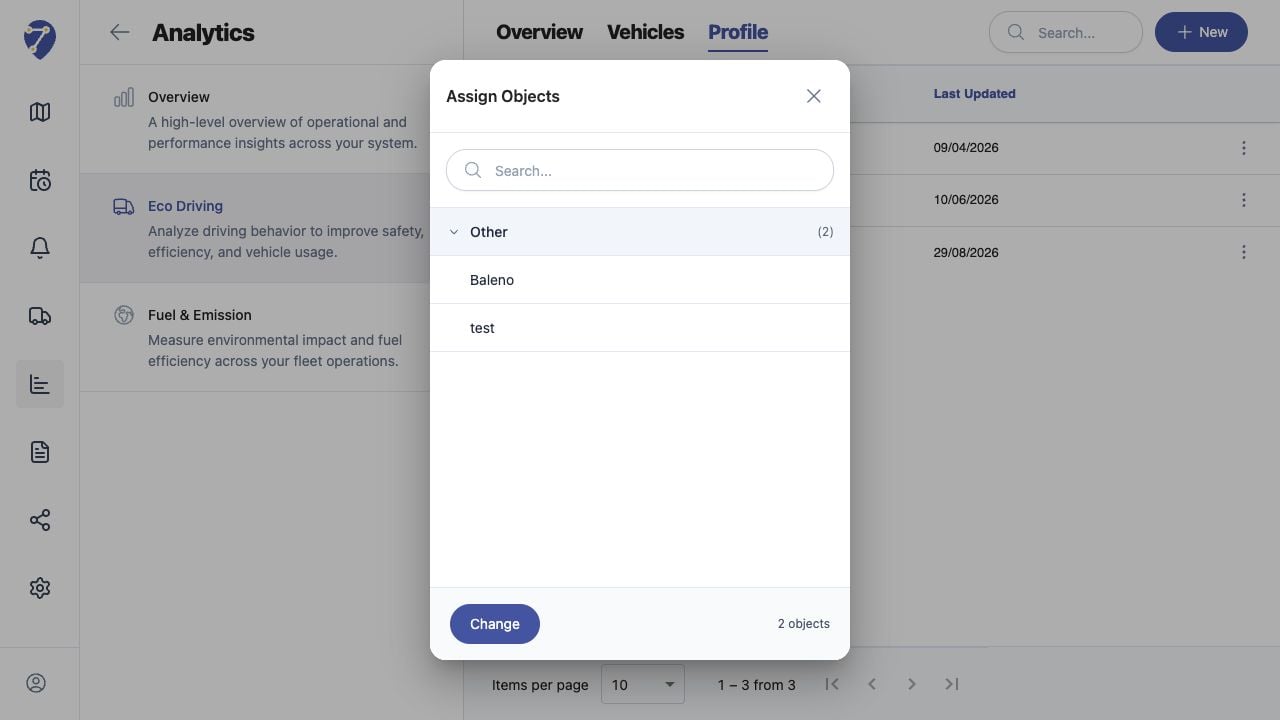
The Assign Objects dialog lists the currently assigned Object group and Objects. Use Search when the list is long.
## Changing Assigned Objects
Click Change, select the required Objects, review the selection, and save the assignment using the available action.
## Assignment Rules
An Object cannot be assigned to another Eco Driving Profile when it is already assigned to a different one. Review the existing Profile before moving it.
## Checking the Result
Return to Profile and confirm Total Object. Then select the Profile on Overview or Vehicles and load a period containing tracking data.
## Reviewing the Assignment
The Assign Objects dialog lists the currently assigned Object group and Objects. Use Search when the list is long.
## Changing Assigned Objects
Click Change, select the required Objects, review the selection, and save the assignment using the available action.
## Assignment Rules
An Object cannot be assigned to another Eco Driving Profile when it is already assigned to a different one. Review the existing Profile before moving it.
## Checking the Result
Return to Profile and confirm Total Object. Then select the Profile on Overview or Vehicles and load a period containing tracking data.