> ## Documentation Index
> Fetch the complete documentation index at: https://docs.jitra.app/llms.txt
> Use this file to discover all available pages before exploring further.
# Creating an Eco Driving Profile
> Learn how to create, edit, and delete an Eco Driving Profile in Jitra Analytics.
An Eco Driving Profile stores one scoring method that can be assigned to compatible Objects.
## Opening the Profile Form
1. Open Analytics > Eco Driving.
2. Select Profile.
3. Click New.
 ## Completing General Settings
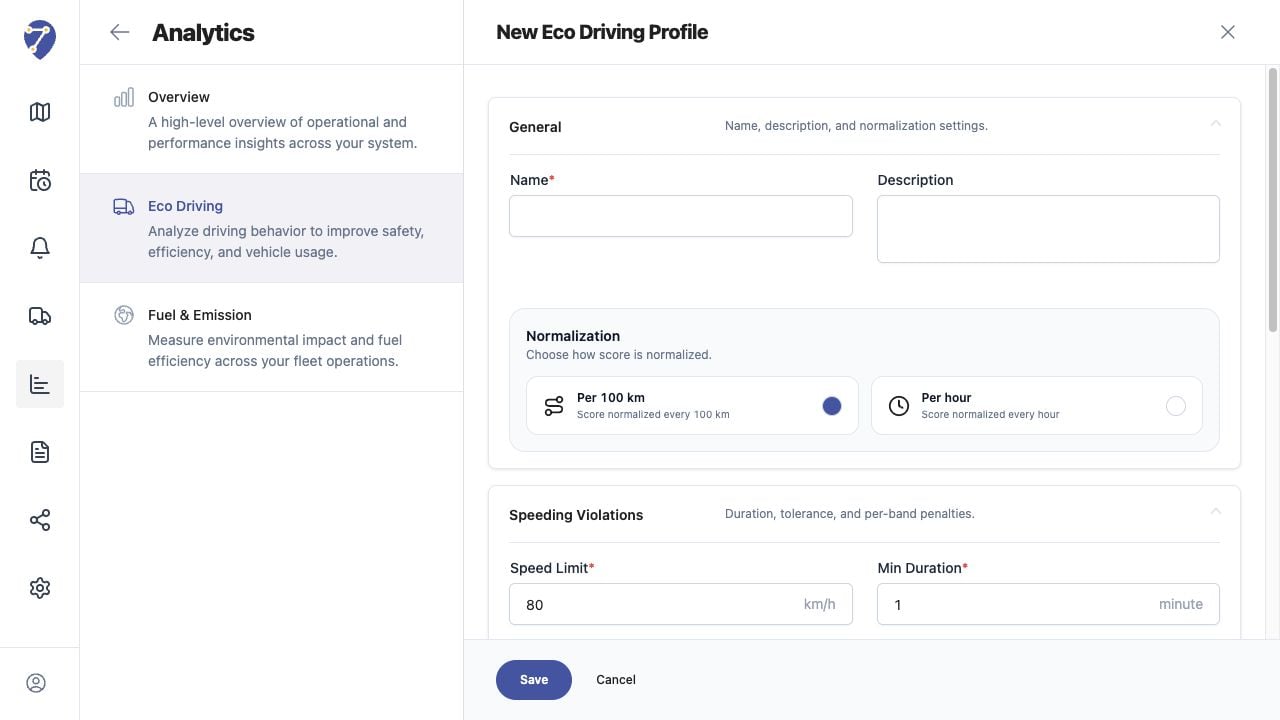
Enter a Name and optional Description, then choose normalization Per 100 km or Per hour.
## Completing Behavior Settings
Configure Speeding Violations, Harsh Driving, and Excessive Idling. Review every required threshold and penalty before clicking Save.
## Editing a Profile
From Profile, open the row action menu and select Edit. Changes affect future calculations shown with that Profile and should be documented before saving.
## Deleting a Profile
Open the row action menu and select Delete. Confirm that the Profile is no longer required and review assigned Objects before deleting it.
## Completing General Settings
Enter a Name and optional Description, then choose normalization Per 100 km or Per hour.
## Completing Behavior Settings
Configure Speeding Violations, Harsh Driving, and Excessive Idling. Review every required threshold and penalty before clicking Save.
## Editing a Profile
From Profile, open the row action menu and select Edit. Changes affect future calculations shown with that Profile and should be documented before saving.
## Deleting a Profile
Open the row action menu and select Delete. Confirm that the Profile is no longer required and review assigned Objects before deleting it.