> ## Documentation Index
> Fetch the complete documentation index at: https://docs.jitra.app/llms.txt
> Use this file to discover all available pages before exploring further.
# Reviewing Eco Driving by Vehicle
> Review Eco Driving scores and Event counts per Object and export the vehicle table to Excel.
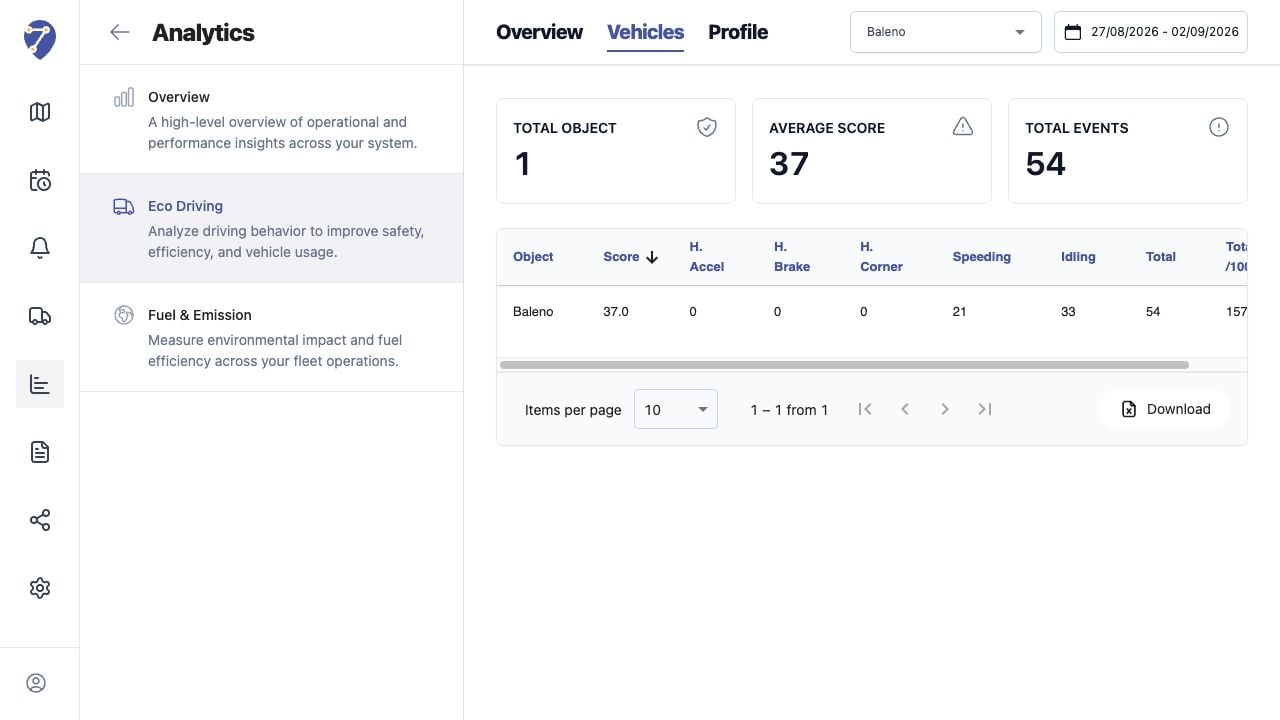
Vehicles provides a detailed row for every assigned Object that has results for the selected Profile and period.
## Loading Vehicle Results
1. Open Analytics > Eco Driving > Vehicles.
2. Select a Profile.
3. Select the date range.
 ## Reading Summary Cards
Total Object, Average Score, and Total Events summarize the currently loaded result.
## Reading the Table
* Object and Score
* H. Accel, H. Brake, and H. Corner
* Speeding and Idling
* Total
* Total /100KM or the normalization used by the Profile
## Sorting and Paging
Click a column heading to sort. Use Items per page and page controls when more Objects are available.
## Downloading Results
Click Download to export the loaded Eco Driving vehicle data to Excel. Confirm the selected Profile and period before using the export externally.
## Reading Summary Cards
Total Object, Average Score, and Total Events summarize the currently loaded result.
## Reading the Table
* Object and Score
* H. Accel, H. Brake, and H. Corner
* Speeding and Idling
* Total
* Total /100KM or the normalization used by the Profile
## Sorting and Paging
Click a column heading to sort. Use Items per page and page controls when more Objects are available.
## Downloading Results
Click Download to export the loaded Eco Driving vehicle data to Excel. Confirm the selected Profile and period before using the export externally.