> ## Documentation Index
> Fetch the complete documentation index at: https://docs.jitra.app/llms.txt
> Use this file to discover all available pages before exploring further.
# Understanding Eco Driving Analytics
> Understand Eco Driving Profiles, fleet safety scores, penalties, behavior trends, and per-Object results in Jitra.
Eco Driving evaluates driving behavior using rules and penalty points defined in an Eco Driving Profile.
## Opening Eco Driving
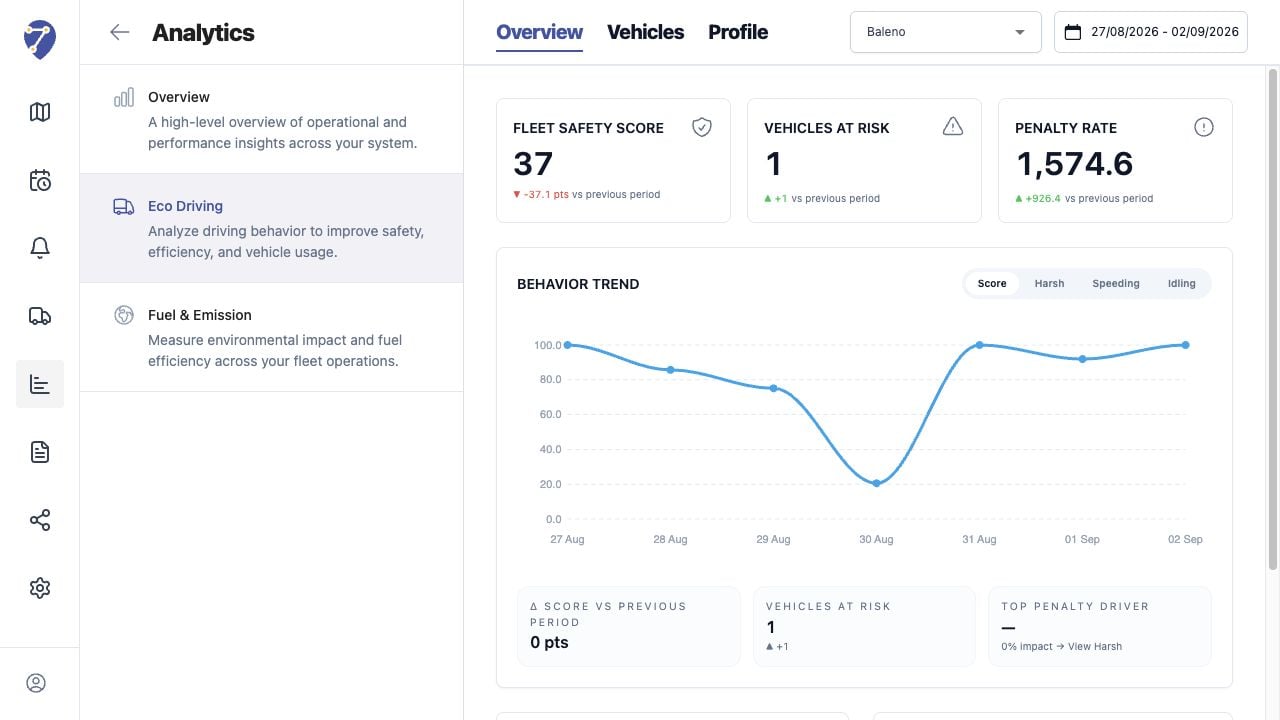
Open Analytics, select Eco Driving, then choose Overview, Vehicles, or Profile.
 ## Behaviors Evaluated
* Speeding
* Harsh Acceleration
* Harsh Braking
* Harsh Cornering
* Excessive Idling
## How Scoring Works
The selected Profile defines thresholds, minimum durations, penalty points, and normalization. Jitra applies those settings to assigned Objects and the loaded period.
## Overview and Vehicles
Overview emphasizes fleet-level score, risk, trend, and penalty contribution. Vehicles provides sortable per-Object counts and normalized totals.
## Important Context
Eco Driving results depend on valid movement data and the selected Profile. A score should be compared only when the Profile, Object assignment, and period are understood.
## Behaviors Evaluated
* Speeding
* Harsh Acceleration
* Harsh Braking
* Harsh Cornering
* Excessive Idling
## How Scoring Works
The selected Profile defines thresholds, minimum durations, penalty points, and normalization. Jitra applies those settings to assigned Objects and the loaded period.
## Overview and Vehicles
Overview emphasizes fleet-level score, risk, trend, and penalty contribution. Vehicles provides sortable per-Object counts and normalized totals.
## Important Context
Eco Driving results depend on valid movement data and the selected Profile. A score should be compared only when the Profile, Object assignment, and period are understood.