> ## Documentation Index
> Fetch the complete documentation index at: https://docs.jitra.app/llms.txt
> Use this file to discover all available pages before exploring further.
# Configuring Fuel and Emission Calculations
> Configure fuel ratio type, fuel type, CO2 factor, fuel ratio, and idle consumption for Fuel & Emission Analytics.
Calculation quality depends on using Profile values that match the assigned vehicle and unit convention.
## Choosing Fuel Ratio Type
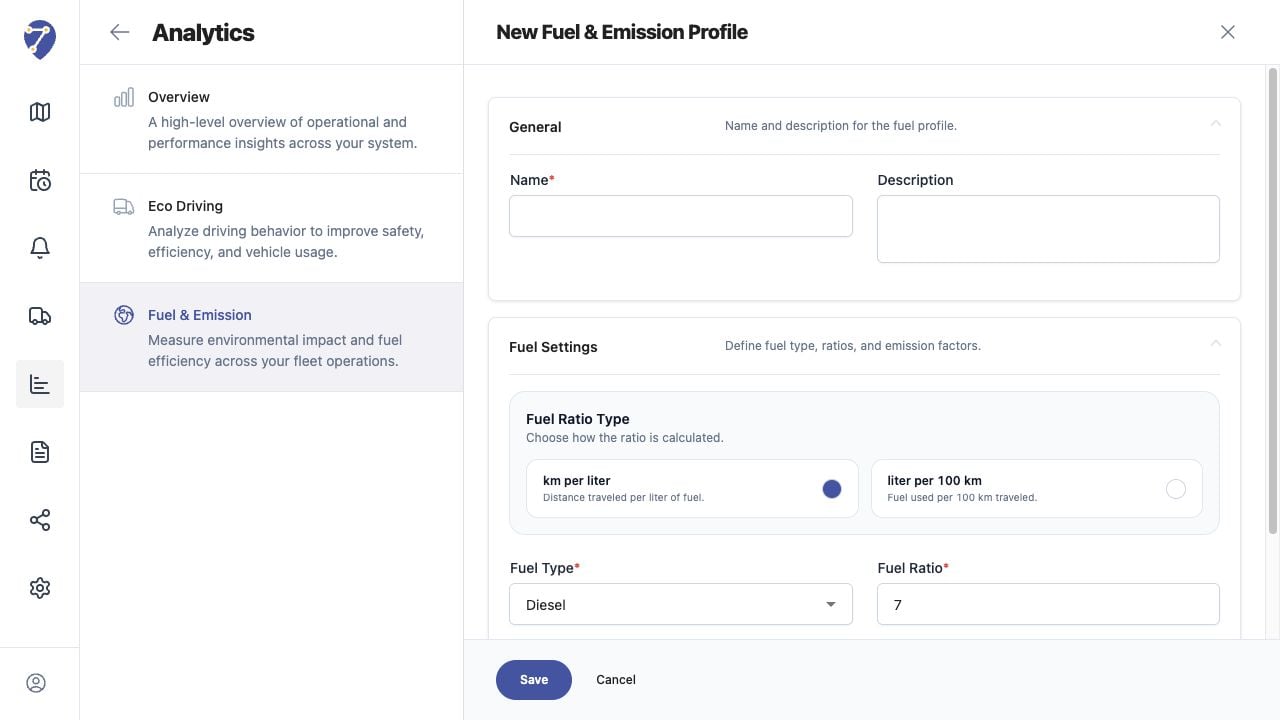
Choose km per liter when Fuel Ratio means distance travelled per liter. Choose liter per 100 km when it means fuel used for each 100 km.
 ## Selecting Fuel Type
Select Diesel or Petrol. Fuel Type provides context for the calculation and should match the vehicle.
## Setting CO2 Factor
CO2 Factor is expressed in kg/L. Use an approved factor appropriate to the fuel and reporting method.
## Setting Fuel Ratio
Enter the expected economy in the unit selected by Fuel Ratio Type. Reversing km/L and L/100 km produces incorrect fuel estimates.
## Setting Idle Fuel
Idle Fuel (L/h) estimates fuel used during idle time. Validate it against vehicle specifications or an approved operational baseline.
## Validating Results
Test the Profile on a known Object and period. Compare Total Distance, calculated Fuel Used, and CO2 results with an approved reference before broader use.
## Selecting Fuel Type
Select Diesel or Petrol. Fuel Type provides context for the calculation and should match the vehicle.
## Setting CO2 Factor
CO2 Factor is expressed in kg/L. Use an approved factor appropriate to the fuel and reporting method.
## Setting Fuel Ratio
Enter the expected economy in the unit selected by Fuel Ratio Type. Reversing km/L and L/100 km produces incorrect fuel estimates.
## Setting Idle Fuel
Idle Fuel (L/h) estimates fuel used during idle time. Validate it against vehicle specifications or an approved operational baseline.
## Validating Results
Test the Profile on a known Object and period. Compare Total Distance, calculated Fuel Used, and CO2 results with an approved reference before broader use.