> ## Documentation Index
> Fetch the complete documentation index at: https://docs.jitra.app/llms.txt
> Use this file to discover all available pages before exploring further.
# Understanding Fuel & Emission Analytics
> Understand how Jitra estimates fuel usage, economy, idle fuel, total CO2, and CO2 intensity using Fuel & Emission Profiles.
Fuel & Emission converts tracked distance and idle time into estimated fuel and CO2 metrics using a selected Profile.
## Opening Fuel & Emission
Open Analytics, select Fuel & Emission, then choose Overview, Vehicles, or Profile.
 ## Profile Inputs
* Fuel Ratio Type
* Fuel Type
* CO2 Factor
* Fuel Ratio
* Idle Fuel (L/h)
## Fuel Metrics
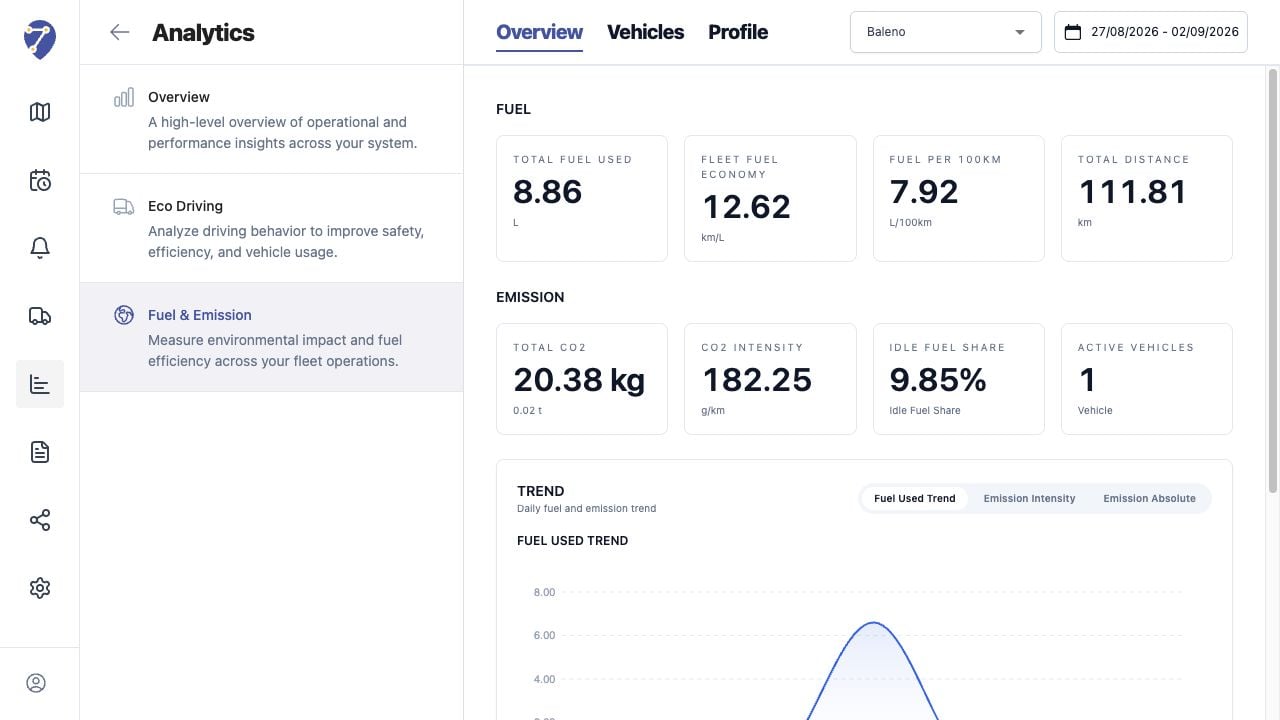
The module reports Total Fuel Used, Fleet Fuel Economy, Fuel per 100km, Total Distance, and Idle Fuel or Idle Fuel Share.
## Emission Metrics
Total CO2 estimates absolute emissions. CO2 Intensity expresses emissions per travelled distance, normally in g/km.
## Estimates and Source Data
These values are calculations based on tracking data and Profile assumptions. They are not direct fuel-sensor or certified emissions measurements unless the documented data source explicitly supports that interpretation.
## Profile Inputs
* Fuel Ratio Type
* Fuel Type
* CO2 Factor
* Fuel Ratio
* Idle Fuel (L/h)
## Fuel Metrics
The module reports Total Fuel Used, Fleet Fuel Economy, Fuel per 100km, Total Distance, and Idle Fuel or Idle Fuel Share.
## Emission Metrics
Total CO2 estimates absolute emissions. CO2 Intensity expresses emissions per travelled distance, normally in g/km.
## Estimates and Source Data
These values are calculations based on tracking data and Profile assumptions. They are not direct fuel-sensor or certified emissions measurements unless the documented data source explicitly supports that interpretation.