> ## Documentation Index
> Fetch the complete documentation index at: https://docs.jitra.app/llms.txt
> Use this file to discover all available pages before exploring further.
# Understanding Analytics in Jitra
> Understand how Jitra Analytics combines operational overview, Eco Driving, and Fuel & Emission insights for tracked Objects.
Analytics turns tracking and configured profile data into operational summaries. It helps an Organization review current fleet status, activity, driving behavior, fuel usage, and estimated emissions.
## Opening Analytics
Select Analytics from the main navigation. The Analytics panel provides Overview, Eco Driving, and Fuel & Emission.
 ## Analytics Overview
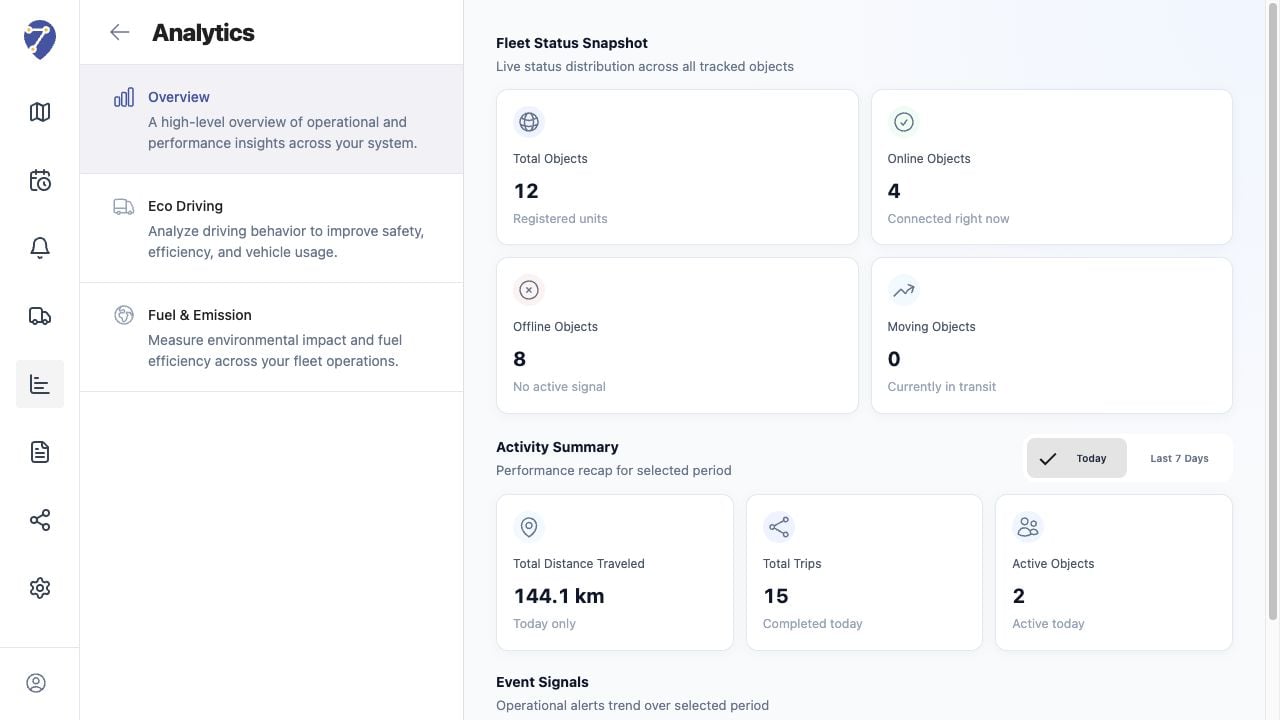
Overview provides Fleet Status Snapshot, Activity Summary, and Event Signals. Use it for a high-level view before investigating a specific Object or performance area.
## Eco Driving
Eco Driving applies a selected Profile to evaluate Speeding, Harsh Acceleration, Harsh Braking, Harsh Cornering, and Excessive Idling. Results are available as fleet summaries and per-Object rows.
## Fuel & Emission
Fuel & Emission uses a selected Profile to estimate fuel usage, fuel economy, idle fuel, total CO2, and CO2 intensity from distance and configured factors.
## Data Requirements
* the user has the required Analytics permissions
* Objects are assigned to the correct Profile
* tracking distance and time data are available for the selected period
* Profile thresholds and calculation factors match the vehicle
## Analytics Overview
Overview provides Fleet Status Snapshot, Activity Summary, and Event Signals. Use it for a high-level view before investigating a specific Object or performance area.
## Eco Driving
Eco Driving applies a selected Profile to evaluate Speeding, Harsh Acceleration, Harsh Braking, Harsh Cornering, and Excessive Idling. Results are available as fleet summaries and per-Object rows.
## Fuel & Emission
Fuel & Emission uses a selected Profile to estimate fuel usage, fuel economy, idle fuel, total CO2, and CO2 intensity from distance and configured factors.
## Data Requirements
* the user has the required Analytics permissions
* Objects are assigned to the correct Profile
* tracking distance and time data are available for the selected period
* Profile thresholds and calculation factors match the vehicle