> ## Documentation Index
> Fetch the complete documentation index at: https://docs.jitra.app/llms.txt
> Use this file to discover all available pages before exploring further.
# Editing and Deleting Event Rules
> Learn how to review, edit, and permanently delete Event rules from Jitra Settings.
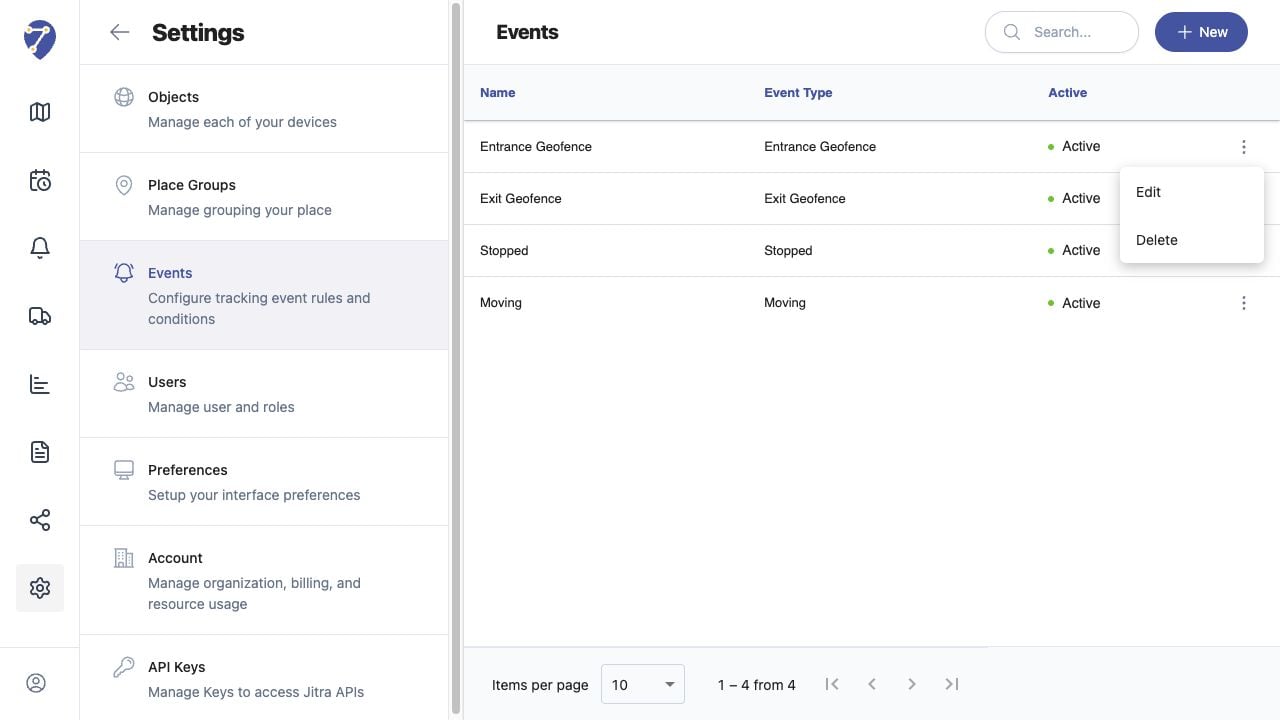
Existing Event rules can be updated or deleted from the Events table. The table also displays each rule's current Active status.
## Opening Event Actions
Open Settings, select Events, then open the action menu at the right of the rule. The available actions are Edit and Delete.
 ## Editing a Rule
Select Edit, update Event Setting, Triggers Setting, or Notifications Setting, then click Save. Review the Object assignment and trigger values carefully because changes affect future Event detection.
## Deleting a Rule
Select Delete to open the confirmation. Jitra identifies the Event and warns that deletion cannot be undone. Click Delete only after confirming the correct rule, or Cancel to keep it.
## Before Deleting
Record any settings that may be needed later and confirm that no users or integrations depend on the rule. Deleting the rule stops future detection for that configuration.
## Editing a Rule
Select Edit, update Event Setting, Triggers Setting, or Notifications Setting, then click Save. Review the Object assignment and trigger values carefully because changes affect future Event detection.
## Deleting a Rule
Select Delete to open the confirmation. Jitra identifies the Event and warns that deletion cannot be undone. Click Delete only after confirming the correct rule, or Cancel to keep it.
## Before Deleting
Record any settings that may be needed later and confirm that no users or integrations depend on the rule. Deleting the rule stops future detection for that configuration.