> ## Documentation Index
> Fetch the complete documentation index at: https://docs.jitra.app/llms.txt
> Use this file to discover all available pages before exploring further.
# Managing Vehicles
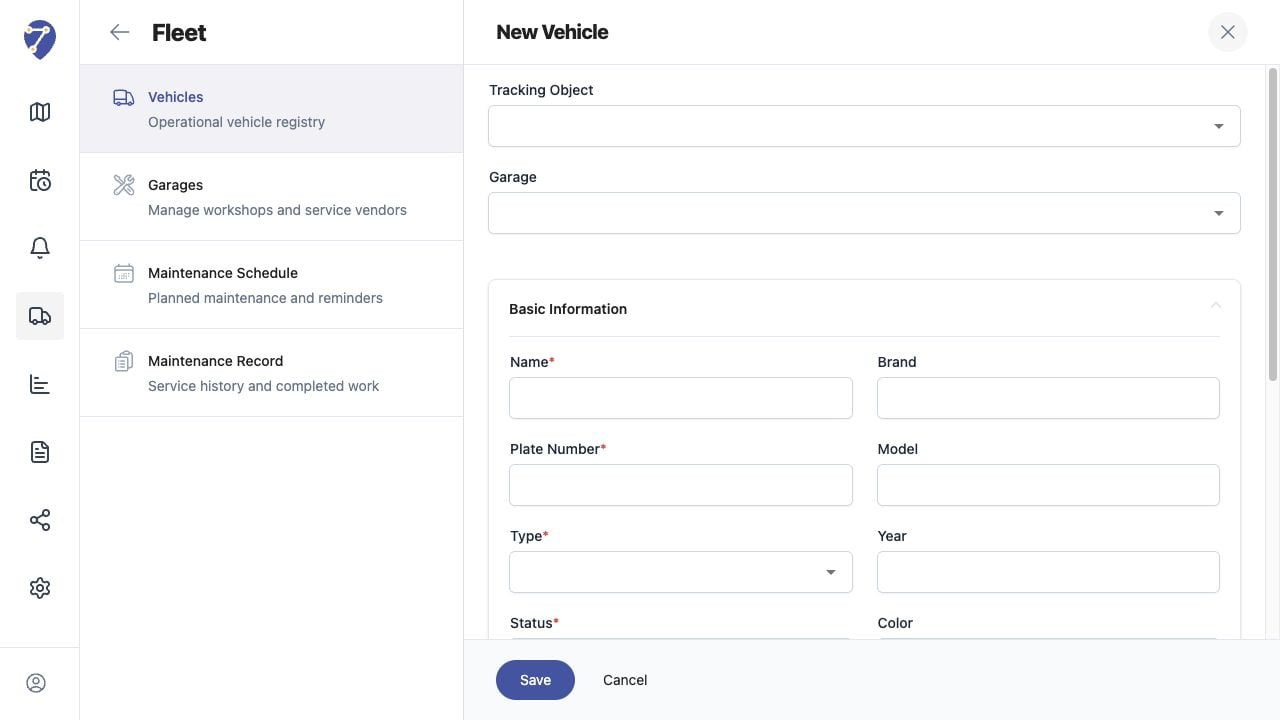
> A Fleet Vehicle stores operational identity and can be linked to a Tracking Object and Garage.
A Fleet Vehicle stores operational identity and can be linked to a Tracking Object and Garage.
## What to Check
* Tracking Object and Garage
* Name, Plate Number, Type, and Status
* Brand, Model, Year, and Color
* VIN, Engine Number, Fuel Type, Ownership Status, and Notes
## Current Jitra Workflow
Open Fleet > Vehicles and use New or the row action menu. Linking does not replace the Object's GPS configuration.
 ## Reviewing the Result
Confirm the saved or displayed information matches the intended Object, users, period, and Organization workflow.
## If the Issue Continues
Review required fields, access permissions, available data, and Organization limits. Contact an Organization administrator or Jitra support when the required control is unavailable.
## Reviewing the Result
Confirm the saved or displayed information matches the intended Object, users, period, and Organization workflow.
## If the Issue Continues
Review required fields, access permissions, available data, and Organization limits. Contact an Organization administrator or Jitra support when the required control is unavailable.