> ## Documentation Index
> Fetch the complete documentation index at: https://docs.jitra.app/llms.txt
> Use this file to discover all available pages before exploring further.
# Configuring Fifotrack Devices
> Configure a Fifotrack GPS Device using the parameter tool or SMS commands to send data to Jitra.
Fifotrack devices connect to Jitra through the Fifotrack protocol listener. Depending on the model, use the official parameter tool or supported SMS commands.
## Official Configuration Tool
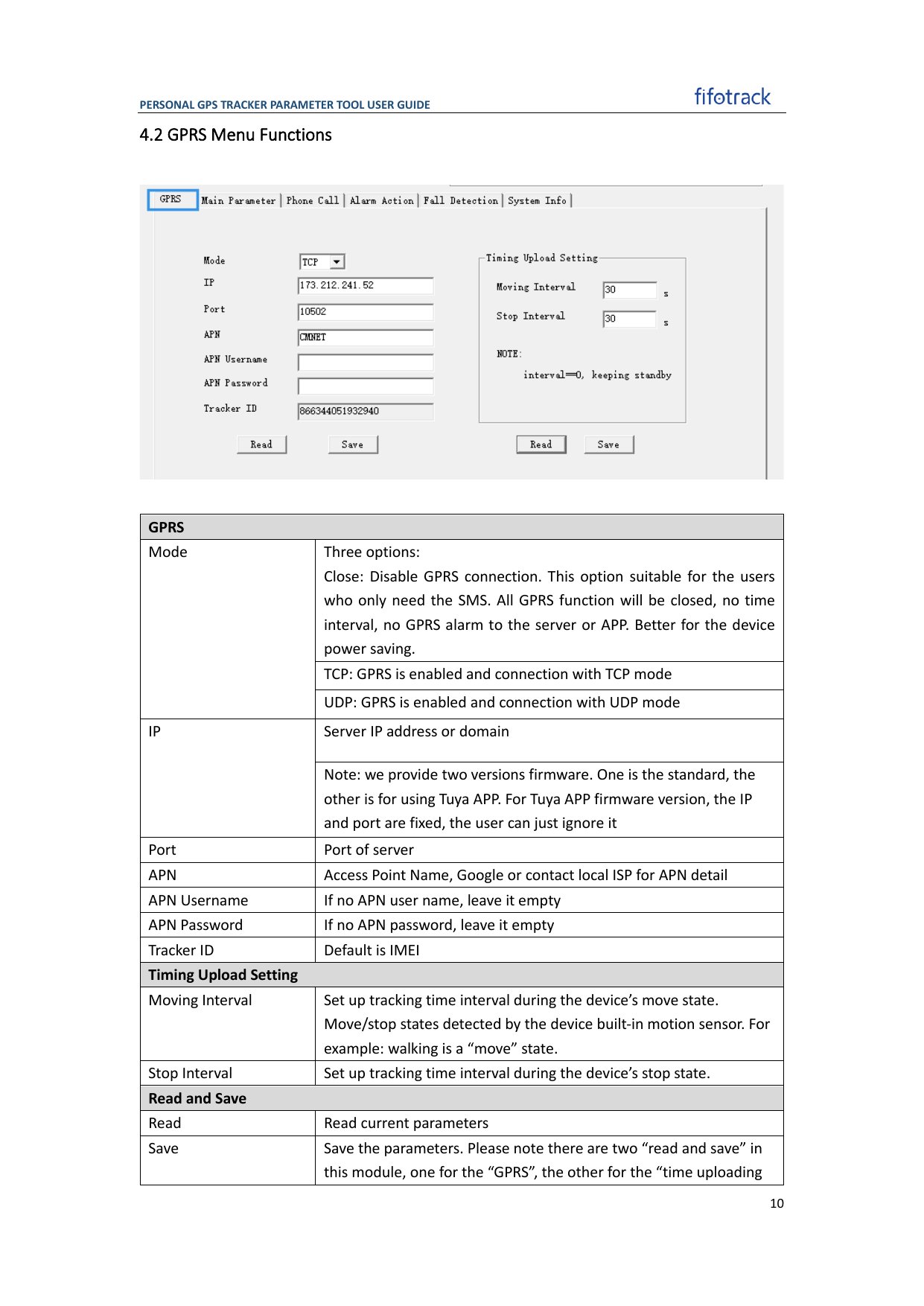 ## Recommended Configuration
| Setting | Value |
| - | - |
| Server | `gw.jitra.app` |
| Port | `24121` |
| Transport | TCP |
| GPRS mode | Enabled |
| SMS / device time zone | UTC / GMT+0 |
| Moving / stopped interval | 30 / 300 seconds |
| Device ID | IMEI or device identifier |
## Configure with the Parameter Tool
1. Connect the device with its supported data cable and open the parameter tool for the exact model.
2. Read and save the existing parameters.
3. Under **GPRS**, enter the SIM APN and credentials, enable GPRS mode, and configure `gw.jitra.app` with port `24121` over TCP.
4. Under the main or reporting parameters, select UTC / GMT+0 and configure the reporting intervals.
5. Save the parameters, restart the device, and read the settings again.
## Recommended Configuration
| Setting | Value |
| - | - |
| Server | `gw.jitra.app` |
| Port | `24121` |
| Transport | TCP |
| GPRS mode | Enabled |
| SMS / device time zone | UTC / GMT+0 |
| Moving / stopped interval | 30 / 300 seconds |
| Device ID | IMEI or device identifier |
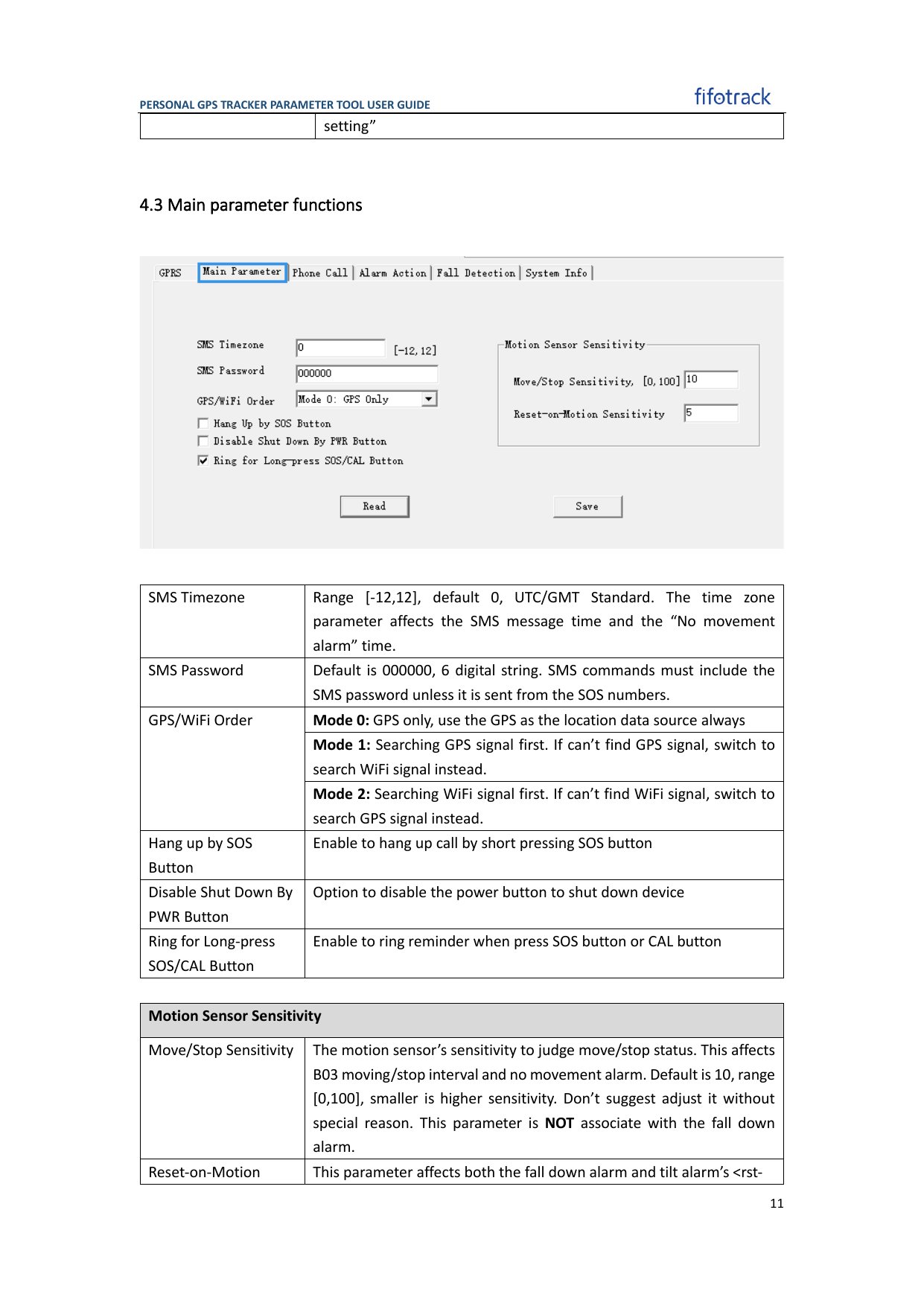
## Configure with the Parameter Tool
1. Connect the device with its supported data cable and open the parameter tool for the exact model.
2. Read and save the existing parameters.
3. Under **GPRS**, enter the SIM APN and credentials, enable GPRS mode, and configure `gw.jitra.app` with port `24121` over TCP.
4. Under the main or reporting parameters, select UTC / GMT+0 and configure the reporting intervals.
5. Save the parameters, restart the device, and read the settings again.
 ## Configure by SMS
Some models use a six-digit password and B-series commands. With the common factory password `000000`, representative commands are:
```text theme={null}
000000,B00,1,gw.jitra.app,24121
000000,B01,,,
000000,B03,30,300
```
Domain support and B-command fields vary by model. Do not send these commands until the exact model manual confirms their format. If a model accepts only an IP address, contact Jitra support instead of resolving and hard-coding a temporary IP.
## Verify in Jitra
Create the Object in **Settings > Objects > New**, select the matching Fifotrack model, and enter its reported identifier. Confirm recent data and correct timestamps on **Tracking**.
## Official References
* [Fifotrack user guides](https://www.fifotrack.com/user-guide)
* [Fifotrack vehicle tracker configuration tools](https://www.fifotrack.com/vehicle-gps-tracker-configure-tool)
* [Fifotrack parameter tool user guide](https://www.fifotrack.com/_files/ugd/015d33_a2fe89d96d664d97ae7bdcd651942e1a.pdf)
* [Fifotrack third-party server configuration example](https://www.fifotrack.com/post/how-to-add-fifotrack-gps-tracker-to-gps-trace)
This documentation is built and hosted on [Mintlify](https://mintlify.com), a developer documentation platform.
## Configure by SMS
Some models use a six-digit password and B-series commands. With the common factory password `000000`, representative commands are:
```text theme={null}
000000,B00,1,gw.jitra.app,24121
000000,B01,,,
000000,B03,30,300
```
Domain support and B-command fields vary by model. Do not send these commands until the exact model manual confirms their format. If a model accepts only an IP address, contact Jitra support instead of resolving and hard-coding a temporary IP.
## Verify in Jitra
Create the Object in **Settings > Objects > New**, select the matching Fifotrack model, and enter its reported identifier. Confirm recent data and correct timestamps on **Tracking**.
## Official References
* [Fifotrack user guides](https://www.fifotrack.com/user-guide)
* [Fifotrack vehicle tracker configuration tools](https://www.fifotrack.com/vehicle-gps-tracker-configure-tool)
* [Fifotrack parameter tool user guide](https://www.fifotrack.com/_files/ugd/015d33_a2fe89d96d664d97ae7bdcd651942e1a.pdf)
* [Fifotrack third-party server configuration example](https://www.fifotrack.com/post/how-to-add-fifotrack-gps-tracker-to-gps-trace)
This documentation is built and hosted on [Mintlify](https://mintlify.com), a developer documentation platform.