> ## Documentation Index
> Fetch the complete documentation index at: https://docs.jitra.app/llms.txt
> Use this file to discover all available pages before exploring further.
# Configuring SinoTrack Devices
> Configure a SinoTrack H02-compatible GPS Device by SMS to send data to Jitra.
Supported SinoTrack devices using the H02 protocol connect to the SinoTrack listener in Jitra. The examples below follow the ST-901M command format with the common factory password `0000`.
## Official Configuration Example
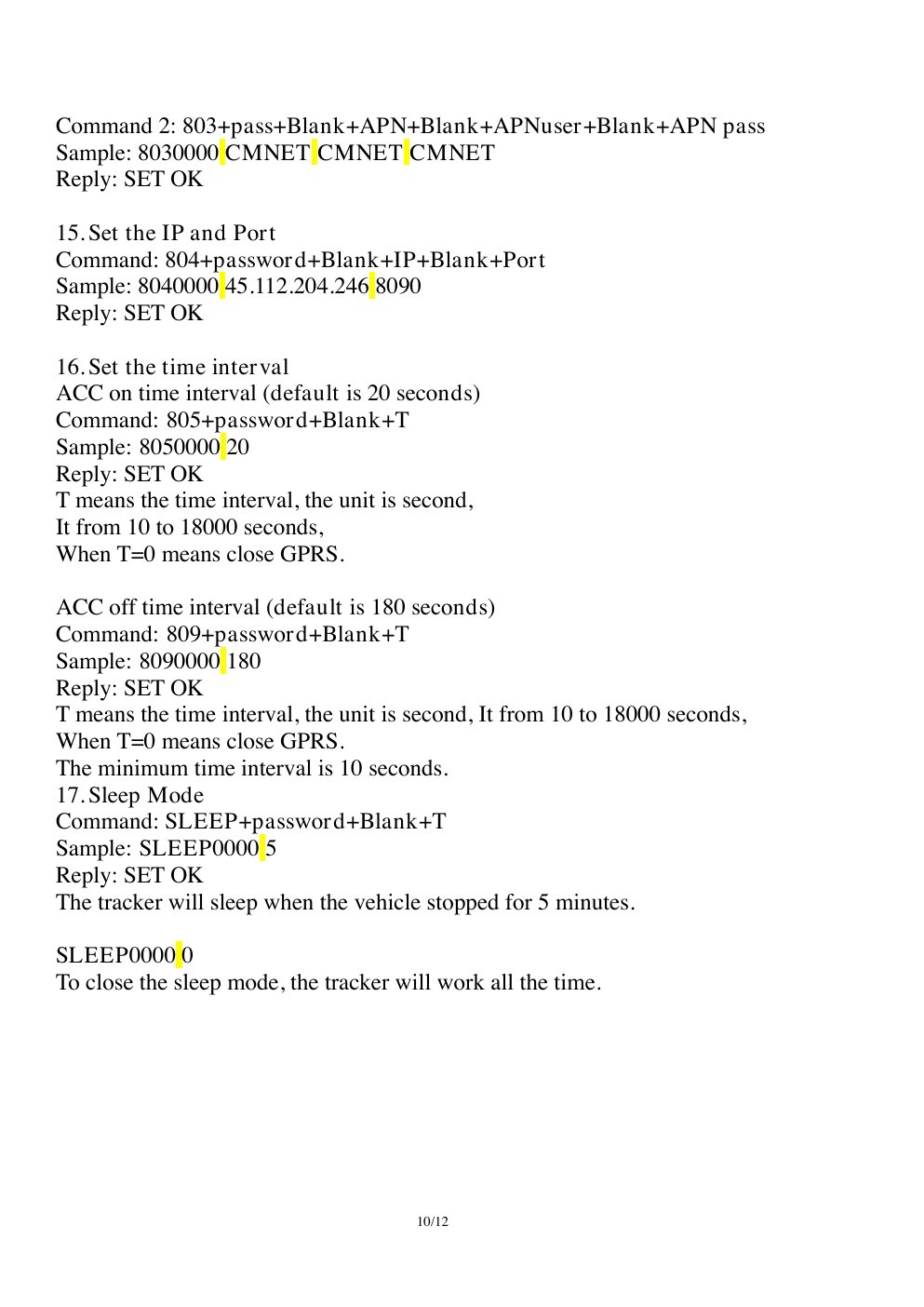 ## Recommended Configuration
| Setting | Value |
| - | - |
| Server | `gw.jitra.app` |
| Port | `24117` |
| Protocol | TCP / H02 |
| GPRS mode | Enabled |
| Time zone | UTC / GMT+0 |
| ACC on / ACC off interval | 30 / 300 seconds |
| Device ID | IMEI |
## Configure by SMS
Replace `` with the SIM operator APN. Send one command at a time and wait for the device reply.
```text theme={null}
7100000
8030000
8040000 gw.jitra.app 24117
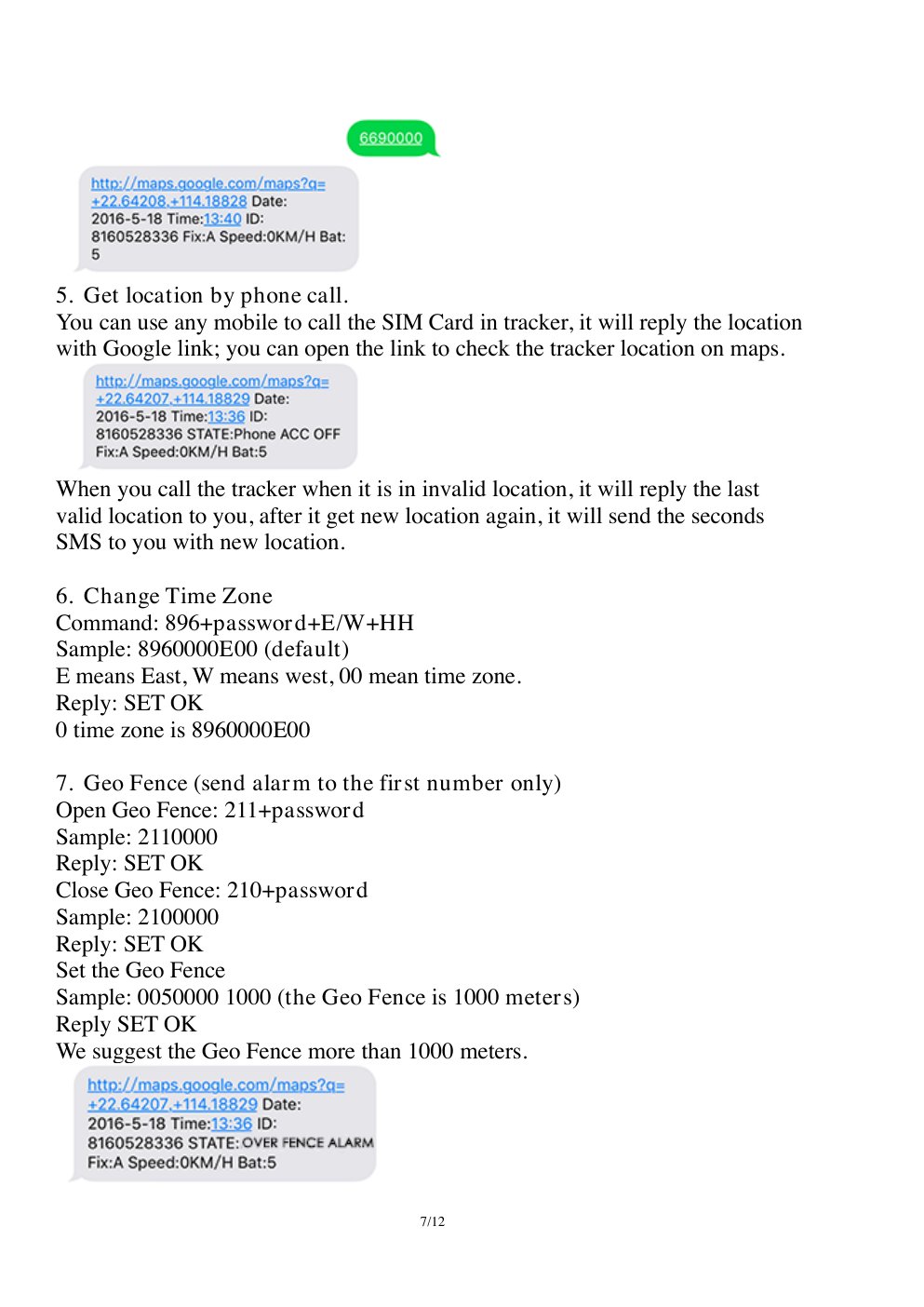
8960000E00
8050000 30
8090000 300
```
`7100000` enables GPRS mode. `8960000E00` sets UTC. If the APN requires a username and password, use the extended `803` syntax documented for the model.
## Recommended Configuration
| Setting | Value |
| - | - |
| Server | `gw.jitra.app` |
| Port | `24117` |
| Protocol | TCP / H02 |
| GPRS mode | Enabled |
| Time zone | UTC / GMT+0 |
| ACC on / ACC off interval | 30 / 300 seconds |
| Device ID | IMEI |
## Configure by SMS
Replace `` with the SIM operator APN. Send one command at a time and wait for the device reply.
```text theme={null}
7100000
8030000
8040000 gw.jitra.app 24117
8960000E00
8050000 30
8090000 300
```
`7100000` enables GPRS mode. `8960000E00` sets UTC. If the APN requires a username and password, use the extended `803` syntax documented for the model.
 ## Read Back the Configuration
Send `RCONF` to supported models. Check that GPRS mode, APN, server, port, intervals, and time zone match the intended values before restarting the device.
SinoTrack models do not all use the same password or syntax. Confirm the manual for the exact model before sending configuration commands.
## Verify in Jitra
Create the Object in **Settings > Objects > New**, select the exact SinoTrack model, and enter its IMEI. On **Tracking**, verify a recent position and ensure the timestamp has no time-zone offset.
## Official References
* [SinoTrack support and manuals](https://www.sinotrackgps.com/support)
* [SinoTrack ST-901 configuration overview](https://www.sinotrackgps.com/product-new-sinotrack-car-security-gps-tracking-device-vehicle-system-st-901-4pin-support-relay-free-app)
* [SinoTrack ST-901M user manual](https://shopcdnalpha.grainajz.com/category/365208/2174/91927b90917e061cc6d702eb08cd45f0/ST-901M%20User%20Manual%20246.pdf)
This documentation is built and hosted on [Mintlify](https://mintlify.com), a developer documentation platform.
## Read Back the Configuration
Send `RCONF` to supported models. Check that GPRS mode, APN, server, port, intervals, and time zone match the intended values before restarting the device.
SinoTrack models do not all use the same password or syntax. Confirm the manual for the exact model before sending configuration commands.
## Verify in Jitra
Create the Object in **Settings > Objects > New**, select the exact SinoTrack model, and enter its IMEI. On **Tracking**, verify a recent position and ensure the timestamp has no time-zone offset.
## Official References
* [SinoTrack support and manuals](https://www.sinotrackgps.com/support)
* [SinoTrack ST-901 configuration overview](https://www.sinotrackgps.com/product-new-sinotrack-car-security-gps-tracking-device-vehicle-system-st-901-4pin-support-relay-free-app)
* [SinoTrack ST-901M user manual](https://shopcdnalpha.grainajz.com/category/365208/2174/91927b90917e061cc6d702eb08cd45f0/ST-901M%20User%20Manual%20246.pdf)
This documentation is built and hosted on [Mintlify](https://mintlify.com), a developer documentation platform.