> ## Documentation Index
> Fetch the complete documentation index at: https://docs.jitra.app/llms.txt
> Use this file to discover all available pages before exploring further.
# Configuring Tracking Accuracy
> Learn how movement, distance, stop detection, speed, signal quality, and GPS accuracy thresholds affect a Jitra Object.
Tracking Accuracy controls how Jitra interprets time, movement, distance, stops, and GPS quality for an Object. Incorrect values can hide valid positions or create misleading movement.
## Opening Tracking Accuracy
Open Settings, select Objects, edit the Object, then expand Tracking Accuracy.
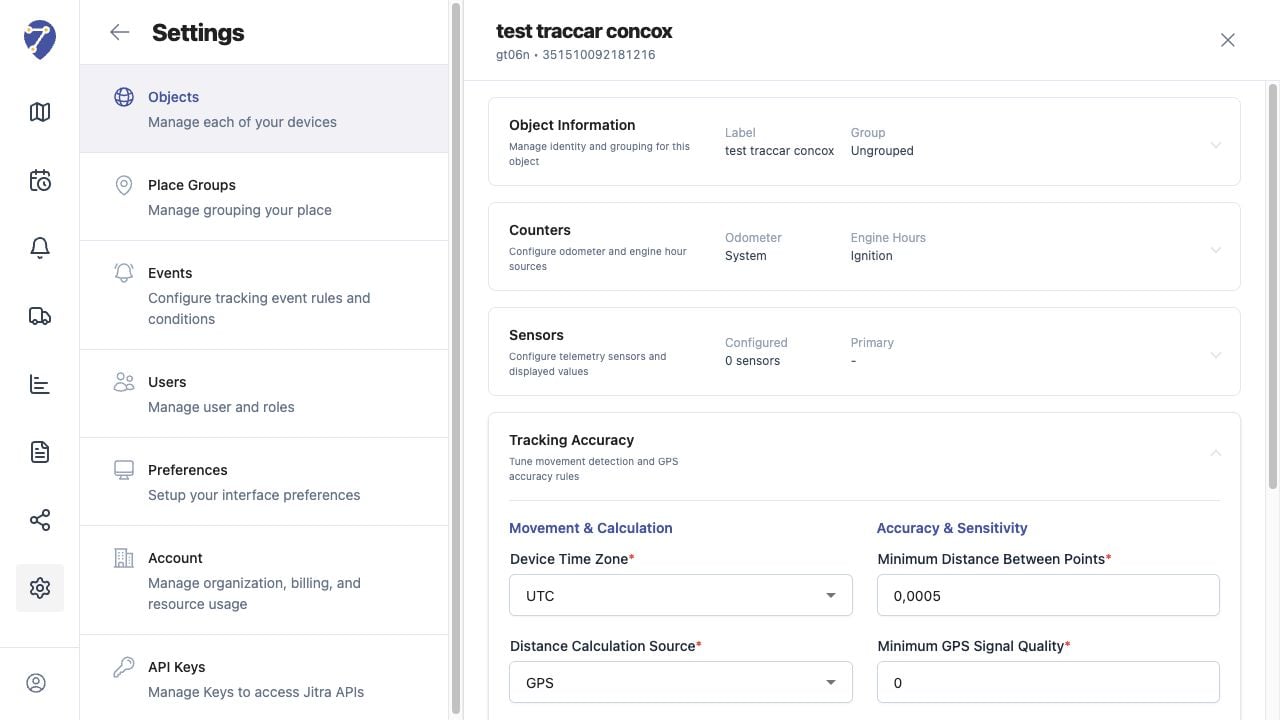 ## Movement and Calculation Settings
* Device Time Zone: timezone used to interpret device timestamps
* Distance Calculation Source: source used for accumulated movement distance
* Stop Detection Method: data used to determine whether the Object has stopped
* Minimum Speed to Detect Movement: speed required before movement is recognized
* Idle Speed Threshold: speed range used when interpreting idle conditions
## Accuracy and Sensitivity Settings
* Minimum Distance Between Points: smallest accepted position change
* Minimum GPS Signal Quality: minimum accepted signal quality
* Maximum GPS Accuracy Error: largest accepted position error
## Choosing Values
Use values appropriate for the GPS Device, installation, asset type, and operating environment. Do not copy settings from another Object without confirming that its hardware and use case are comparable.
## Saving and Testing
Click Save after making a valid change. Review Tracking and History after new data arrives to confirm that movement, stops, routes, and distance behave as expected.
## If Positions Are Missing or Noisy
Overly strict signal, distance, or accuracy thresholds can reject useful points. Values that are too permissive can accept weak positions and produce jumps. Adjust one group of settings at a time and verify the result.
## Movement and Calculation Settings
* Device Time Zone: timezone used to interpret device timestamps
* Distance Calculation Source: source used for accumulated movement distance
* Stop Detection Method: data used to determine whether the Object has stopped
* Minimum Speed to Detect Movement: speed required before movement is recognized
* Idle Speed Threshold: speed range used when interpreting idle conditions
## Accuracy and Sensitivity Settings
* Minimum Distance Between Points: smallest accepted position change
* Minimum GPS Signal Quality: minimum accepted signal quality
* Maximum GPS Accuracy Error: largest accepted position error
## Choosing Values
Use values appropriate for the GPS Device, installation, asset type, and operating environment. Do not copy settings from another Object without confirming that its hardware and use case are comparable.
## Saving and Testing
Click Save after making a valid change. Review Tracking and History after new data arrives to confirm that movement, stops, routes, and distance behave as expected.
## If Positions Are Missing or Noisy
Overly strict signal, distance, or accuracy thresholds can reject useful points. Values that are too permissive can accept weak positions and produce jumps. Adjust one group of settings at a time and verify the result.