> ## Documentation Index
> Fetch the complete documentation index at: https://docs.jitra.app/llms.txt
> Use this file to discover all available pages before exploring further.
# Exporting Reports
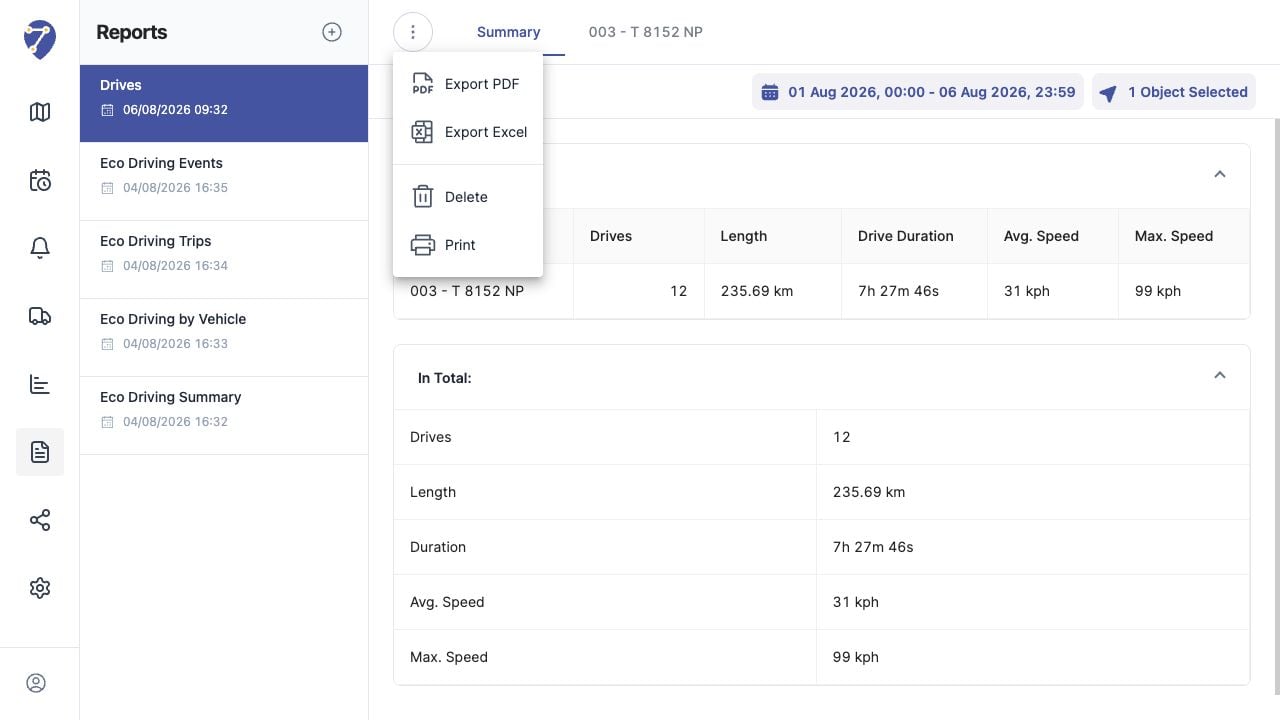
> A loaded Report can be exported or printed from its action menu.
A loaded Report can be exported or printed from its action menu.
## What to Check
1. Open the required Report.
2. Open the ellipsis menu above the results.
3. Select Export PDF, Export Excel, or Print.
4. Wait for the file or print view to finish preparing.
## Current Jitra Workflow
The same action menu also contains Delete. Verify the selected command before continuing.
 ## Reviewing the Result
Confirm the saved or displayed information matches the intended Object, users, period, and Organization workflow.
## If the Issue Continues
Review required fields, access permissions, available data, and Organization limits. Contact an Organization administrator or Jitra support when the required control is unavailable.
## Reviewing the Result
Confirm the saved or displayed information matches the intended Object, users, period, and Organization workflow.
## If the Issue Continues
Review required fields, access permissions, available data, and Organization limits. Contact an Organization administrator or Jitra support when the required control is unavailable.