> ## Documentation Index
> Fetch the complete documentation index at: https://docs.jitra.app/llms.txt
> Use this file to discover all available pages before exploring further.
# Understanding Ignition
> An Ignition Sensor indicates whether the vehicle ignition or engine-related input is on or off.
An Ignition Sensor indicates whether the vehicle ignition or engine-related input is on or off.
## What to Check
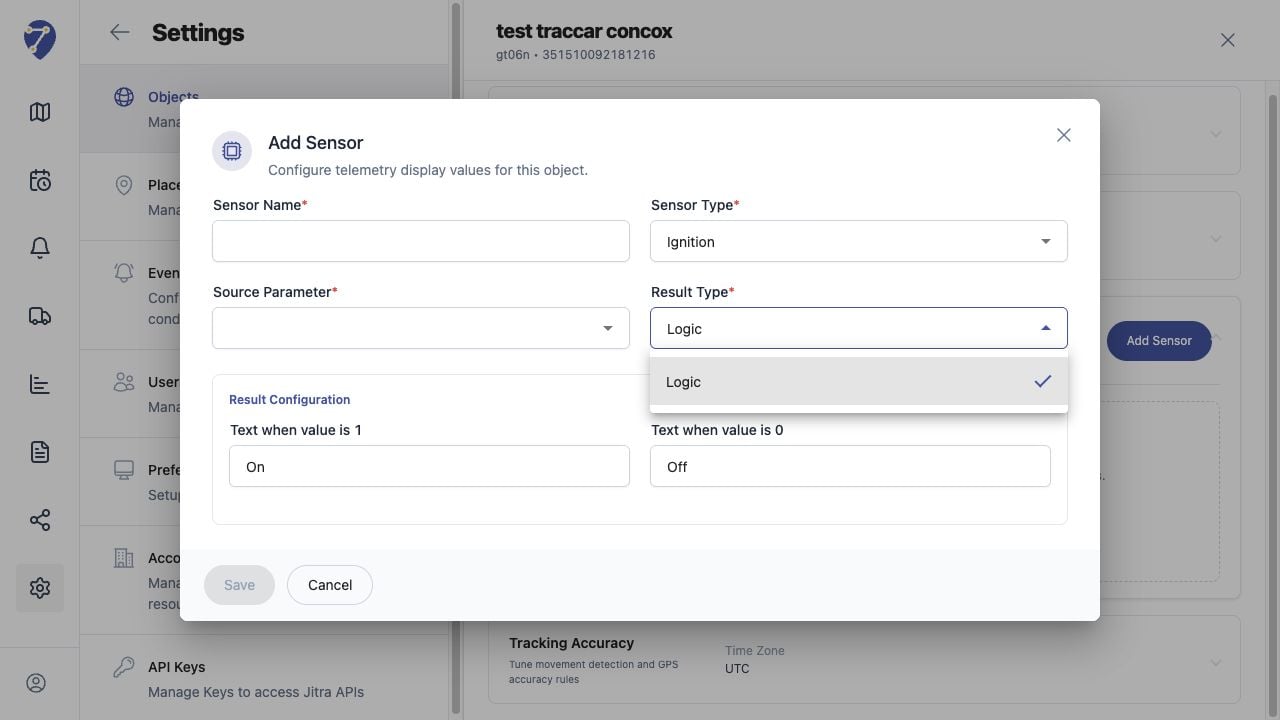
* Choose the source parameter supplied by the device.
* Map raw values to clear On and Off results.
* Confirm the installation uses the same electrical input.
* Compare the value with movement and Engine Idle status.
## Current Jitra Workflow
Create or edit a Sensor and select the relevant source parameter and result conditions.
 ## Reviewing the Result
Confirm the saved or displayed information matches the intended Object, users, period, and Organization workflow.
## If the Issue Continues
Review required fields, access permissions, available data, and Organization limits. Contact an Organization administrator or Jitra support when the required control is unavailable.
## Reviewing the Result
Confirm the saved or displayed information matches the intended Object, users, period, and Organization workflow.
## If the Issue Continues
Review required fields, access permissions, available data, and Organization limits. Contact an Organization administrator or Jitra support when the required control is unavailable.