> ## Documentation Index
> Fetch the complete documentation index at: https://docs.jitra.app/llms.txt
> Use this file to discover all available pages before exploring further.
# Viewing Object Details
> Learn how to open Object details and read the latest location, update time, status, odometer, and engine hours.
Object details provide a compact summary of the latest data Jitra has received for a selected Object.
## Opening Object Details
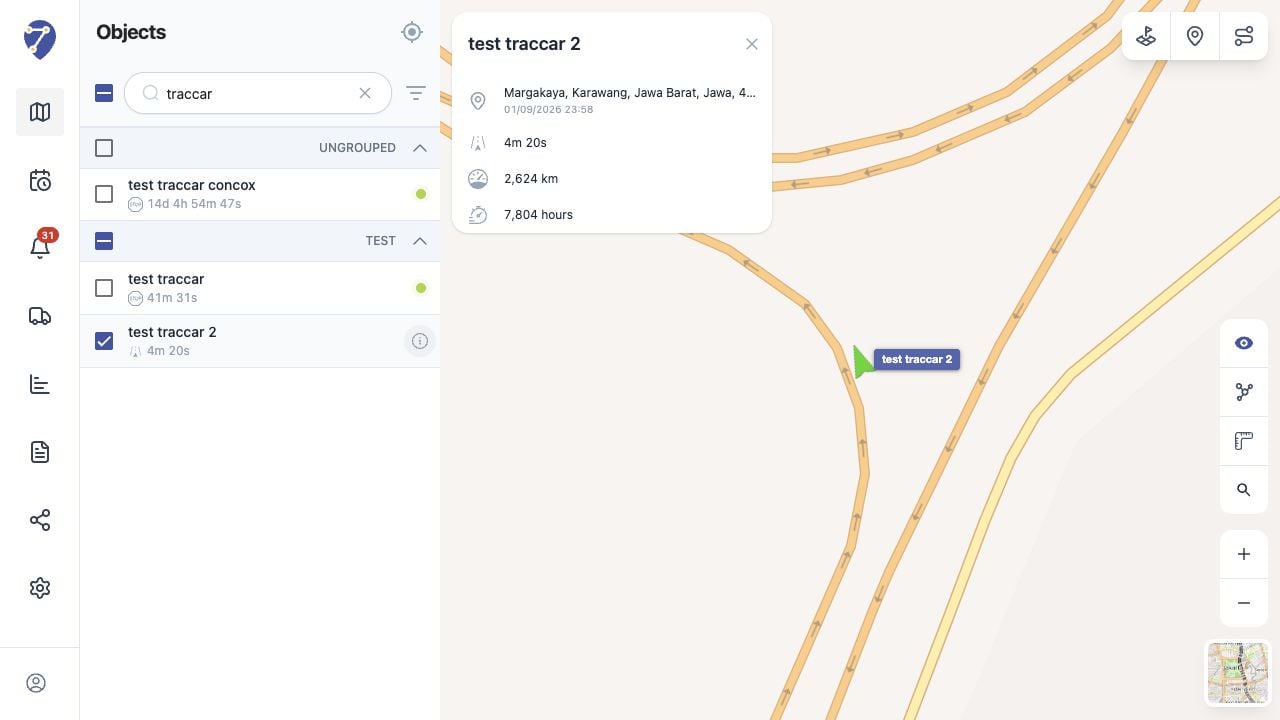
Click an Object marker on the map, or point to an Object row and click its information button.
 ## Information in the Details Panel
* Object name
* latest location or address
* time of the latest received position
* current status and its duration
* odometer
* engine hours
Available values depend on the GPS Device and Object configuration.
## Understanding the Update Time
The timestamp identifies when Jitra received the displayed position. It is important when reviewing an Object that is Stopped or Offline.
## Closing the Details Panel
Click the close button in the upper-right corner of the panel. Closing the panel does not remove the Object from the map.
## Information in the Details Panel
* Object name
* latest location or address
* time of the latest received position
* current status and its duration
* odometer
* engine hours
Available values depend on the GPS Device and Object configuration.
## Understanding the Update Time
The timestamp identifies when Jitra received the displayed position. It is important when reviewing an Object that is Stopped or Offline.
## Closing the Details Panel
Click the close button in the upper-right corner of the panel. Closing the panel does not remove the Object from the map.