> ## Documentation Index
> Fetch the complete documentation index at: https://docs.jitra.app/llms.txt
> Use this file to discover all available pages before exploring further.
# Notifications Are Not Received
> A Notification can fail because the Event was not created, the delivery option is off, quota is exhausted, or the external channel failed.
A Notification can fail because the Event was not created, the delivery option is off, quota is exhausted, or the external channel failed.
## What to Check
* Confirm the Event exists in Event Notifications or History.
* Verify the correct Object and trigger.
* Check cooldown.
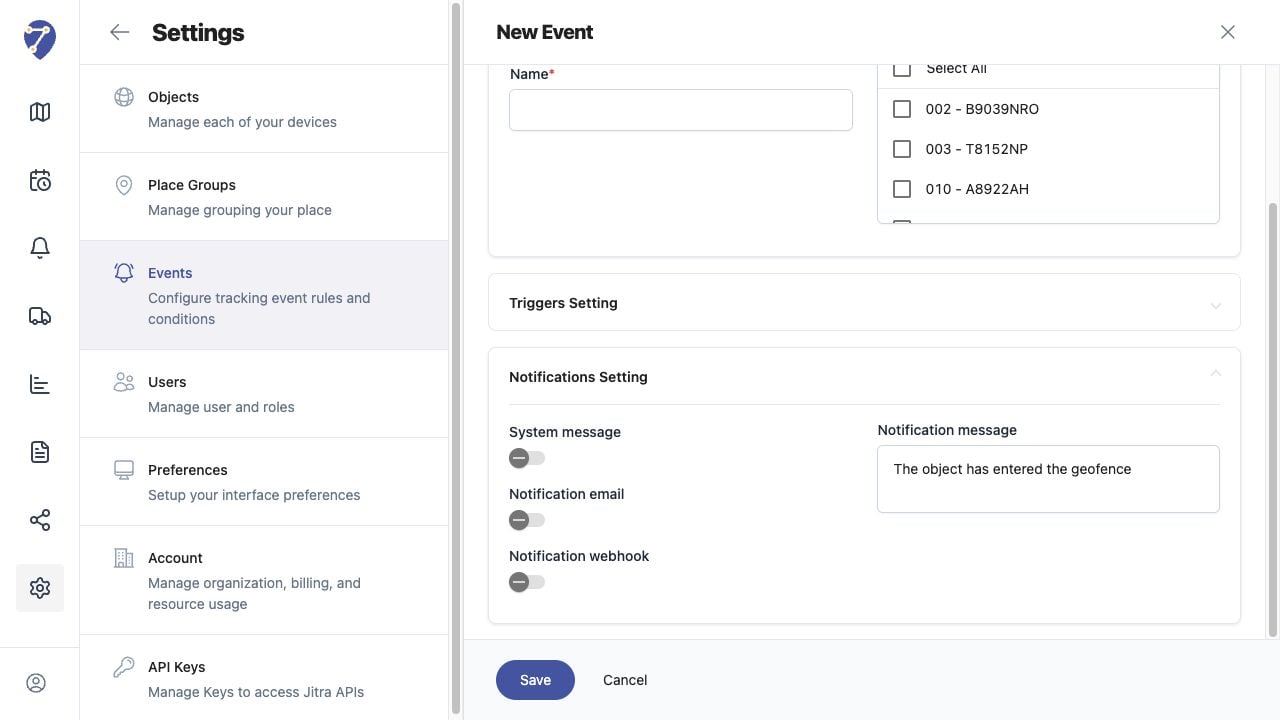
* Enable System message, Notification email, or Notification webhook as required.
* Check Integration usage and external delivery.
## Current Jitra Workflow
Separate Event detection from delivery by checking System message first, then email or webhook.
 ## Reviewing the Result
Confirm the saved or displayed information matches the intended Object, users, period, and Organization workflow.
## If the Issue Continues
Review required fields, access permissions, available data, and Organization limits. Contact an Organization administrator or Jitra support when the required control is unavailable.
## Reviewing the Result
Confirm the saved or displayed information matches the intended Object, users, period, and Organization workflow.
## If the Issue Continues
Review required fields, access permissions, available data, and Organization limits. Contact an Organization administrator or Jitra support when the required control is unavailable.