> ## Documentation Index
> Fetch the complete documentation index at: https://docs.jitra.app/llms.txt
> Use this file to discover all available pages before exploring further.
# Mengonfigurasi Perangkat SinoTrack
> Konfigurasikan GPS Device SinoTrack yang kompatibel dengan H02 melalui SMS agar mengirim data ke Jitra.
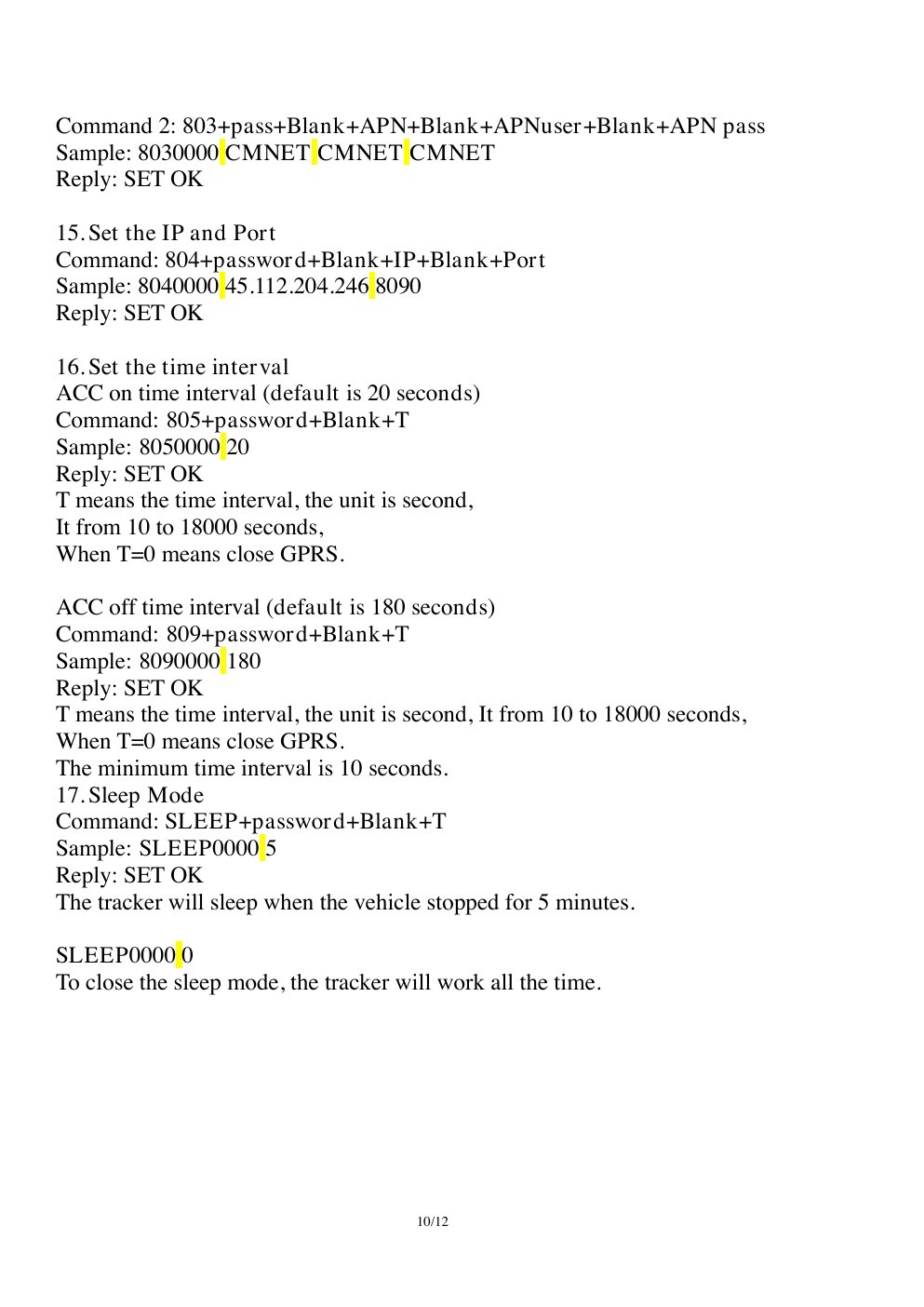
Perangkat SinoTrack yang didukung dan menggunakan protokol H02 terhubung ke listener SinoTrack di Jitra. Contoh berikut mengikuti format command ST-901M dengan password pabrik yang umum, yaitu `0000`.
## Contoh Konfigurasi Resmi
 ## Konfigurasi yang Direkomendasikan
| Pengaturan | Nilai |
| - | - |
| Server | `gw.jitra.app` |
| Port | `24117` |
| Protocol | TCP / H02 |
| Mode GPRS | Aktif |
| Time zone | UTC / GMT+0 |
| Interval ACC on / ACC off | 30 / 300 detik |
| Device ID | IMEI |
## Konfigurasi melalui SMS
Ganti `` dengan APN operator SIM. Kirim satu command setiap kali dan tunggu balasan perangkat.
```text theme={null}
7100000
8030000
8040000 gw.jitra.app 24117
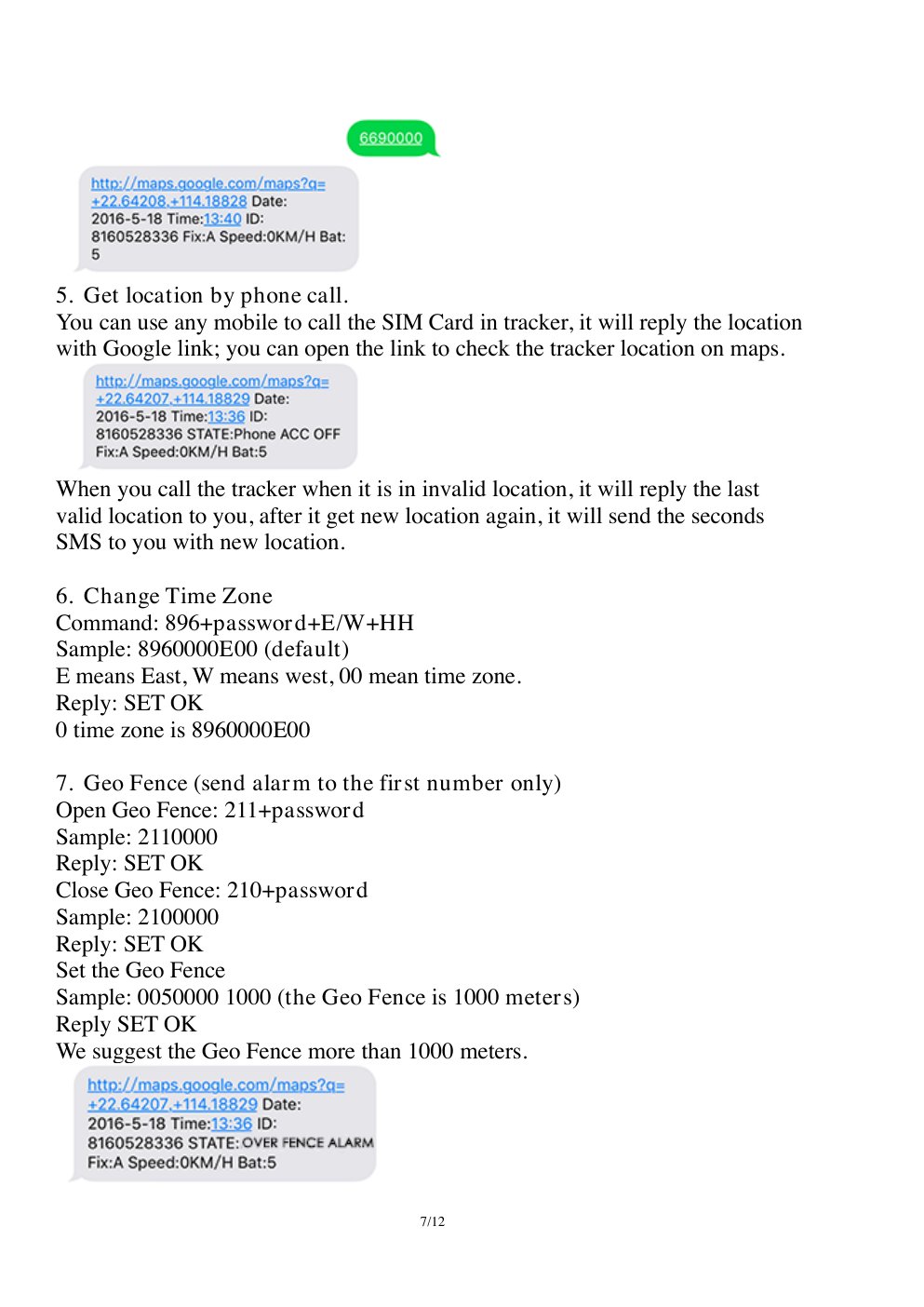
8960000E00
8050000 30
8090000 300
```
`7100000` mengaktifkan mode GPRS. `8960000E00` mengatur UTC. Jika APN memerlukan username dan password, gunakan format lengkap command `803` pada manual model.
## Konfigurasi yang Direkomendasikan
| Pengaturan | Nilai |
| - | - |
| Server | `gw.jitra.app` |
| Port | `24117` |
| Protocol | TCP / H02 |
| Mode GPRS | Aktif |
| Time zone | UTC / GMT+0 |
| Interval ACC on / ACC off | 30 / 300 detik |
| Device ID | IMEI |
## Konfigurasi melalui SMS
Ganti `` dengan APN operator SIM. Kirim satu command setiap kali dan tunggu balasan perangkat.
```text theme={null}
7100000
8030000
8040000 gw.jitra.app 24117
8960000E00
8050000 30
8090000 300
```
`7100000` mengaktifkan mode GPRS. `8960000E00` mengatur UTC. Jika APN memerlukan username dan password, gunakan format lengkap command `803` pada manual model.
 ## Baca Kembali Konfigurasi
Kirim `RCONF` pada model yang mendukung. Pastikan mode GPRS, APN, server, port, interval, dan time zone sudah sesuai sebelum restart.
Tidak semua model SinoTrack menggunakan password atau syntax yang sama. Periksa manual model yang tepat sebelum mengirim command konfigurasi.
## Verifikasi di Jitra
Buat Object melalui **Settings > Objects > New**, pilih model SinoTrack yang tepat, lalu masukkan IMEI. Pada **Tracking**, periksa posisi terbaru dan pastikan timestamp tidak mengalami offset time zone.
## Referensi Resmi
* [Support dan manual SinoTrack](https://www.sinotrackgps.com/support)
* [Ringkasan konfigurasi SinoTrack ST-901](https://www.sinotrackgps.com/product-new-sinotrack-car-security-gps-tracking-device-vehicle-system-st-901-4pin-support-relay-free-app)
* [Manual SinoTrack ST-901M](https://shopcdnalpha.grainajz.com/category/365208/2174/91927b90917e061cc6d702eb08cd45f0/ST-901M%20User%20Manual%20246.pdf)
This documentation is built and hosted on [Mintlify](https://mintlify.com), a developer documentation platform.
## Baca Kembali Konfigurasi
Kirim `RCONF` pada model yang mendukung. Pastikan mode GPRS, APN, server, port, interval, dan time zone sudah sesuai sebelum restart.
Tidak semua model SinoTrack menggunakan password atau syntax yang sama. Periksa manual model yang tepat sebelum mengirim command konfigurasi.
## Verifikasi di Jitra
Buat Object melalui **Settings > Objects > New**, pilih model SinoTrack yang tepat, lalu masukkan IMEI. Pada **Tracking**, periksa posisi terbaru dan pastikan timestamp tidak mengalami offset time zone.
## Referensi Resmi
* [Support dan manual SinoTrack](https://www.sinotrackgps.com/support)
* [Ringkasan konfigurasi SinoTrack ST-901](https://www.sinotrackgps.com/product-new-sinotrack-car-security-gps-tracking-device-vehicle-system-st-901-4pin-support-relay-free-app)
* [Manual SinoTrack ST-901M](https://shopcdnalpha.grainajz.com/category/365208/2174/91927b90917e061cc6d702eb08cd45f0/ST-901M%20User%20Manual%20246.pdf)
This documentation is built and hosted on [Mintlify](https://mintlify.com), a developer documentation platform.