
Triggers Setting defines the values that must match before Jitra creates an Event. The available fields depend on the Event Type.

Opening Triggers Setting

Create or edit an Event rule, select its Event Type, then expand Triggers Setting. Complete every required field shown for that type.

Configuring an Over Speed Trigger

For Over Speed, enter the Speed limit in kph. Depending on geofences can leave the rule independent of geofences or restrict it to positions Inside or Outside selected geofences.
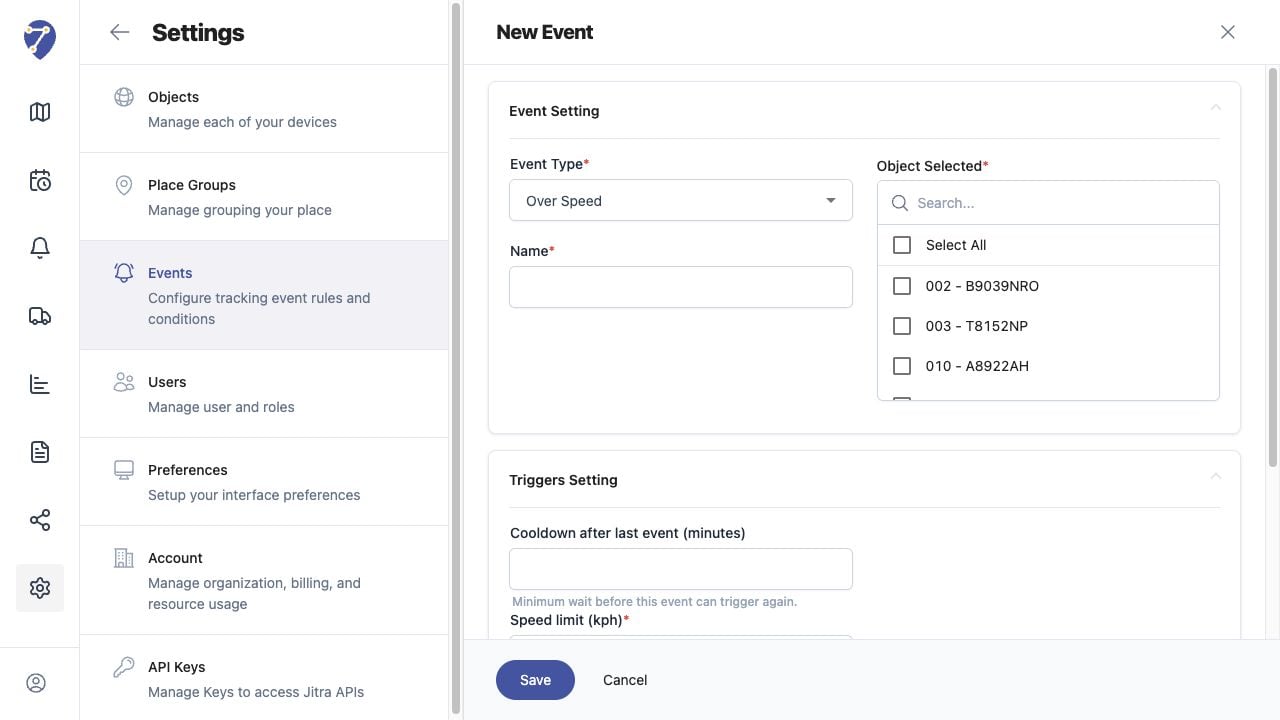
Configuring Event Triggers and Cooldowns in Jitra staging

Using Cooldown

Cooldown after last event sets the minimum number of minutes before the same rule can create another Event. Increase it to reduce repeated notifications for a continuing condition; lower it when repeated occurrences must be recorded more frequently.

Testing Trigger Values

Save the rule and evaluate it using new Object data. If no Event appears, confirm the incoming data can satisfy the configured threshold and that cooldown from a previous Event has elapsed.