
Notifications Setting determines how Jitra communicates an Event after its trigger condition is met.

Opening Notifications Setting

Create or edit an Event rule, then expand Notifications Setting after completing Event Setting and Triggers Setting.

Selecting Notification Options

  • System message: displays the Event in Jitra Event Notifications
  • Notification email: sends an email notification
  • Notification webhook: sends the notification to an integrated webhook
  • Notification message: defines the message used for the Event
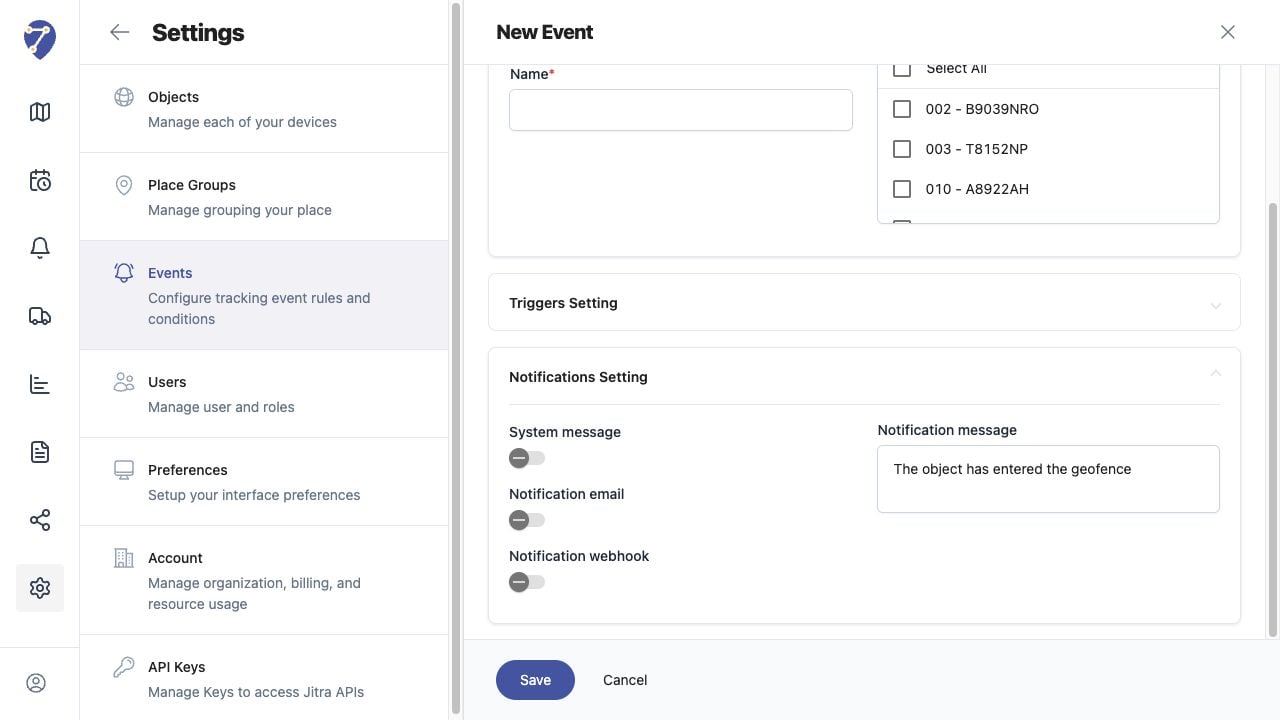
Configuring Notifications for an Event in Jitra staging

Choosing Delivery Methods

Enable only the methods required for the rule. At least System message should be enabled when users need to review the Event directly in Jitra.

Verifying Delivery

After saving, wait for new Object data that satisfies the trigger. Check Event Notifications first, then verify email or webhook delivery when those options are enabled and configured for the Organization.