
Inaccurate locations usually come from weak GPS conditions, installation, stale data, or Tracking Accuracy thresholds.

What to Check

  • Check timestamp and GPS accuracy.
  • Move the antenna away from obstruction or interference.
  • Compare raw points and route history.
  • Review Minimum GPS Signal Quality and Maximum GPS Accuracy Error.
  • Avoid correcting the map position manually without fixing the source.

Current Jitra Workflow

Open Object Tracking Accuracy and adjust one threshold at a time only after confirming the device data and environment.
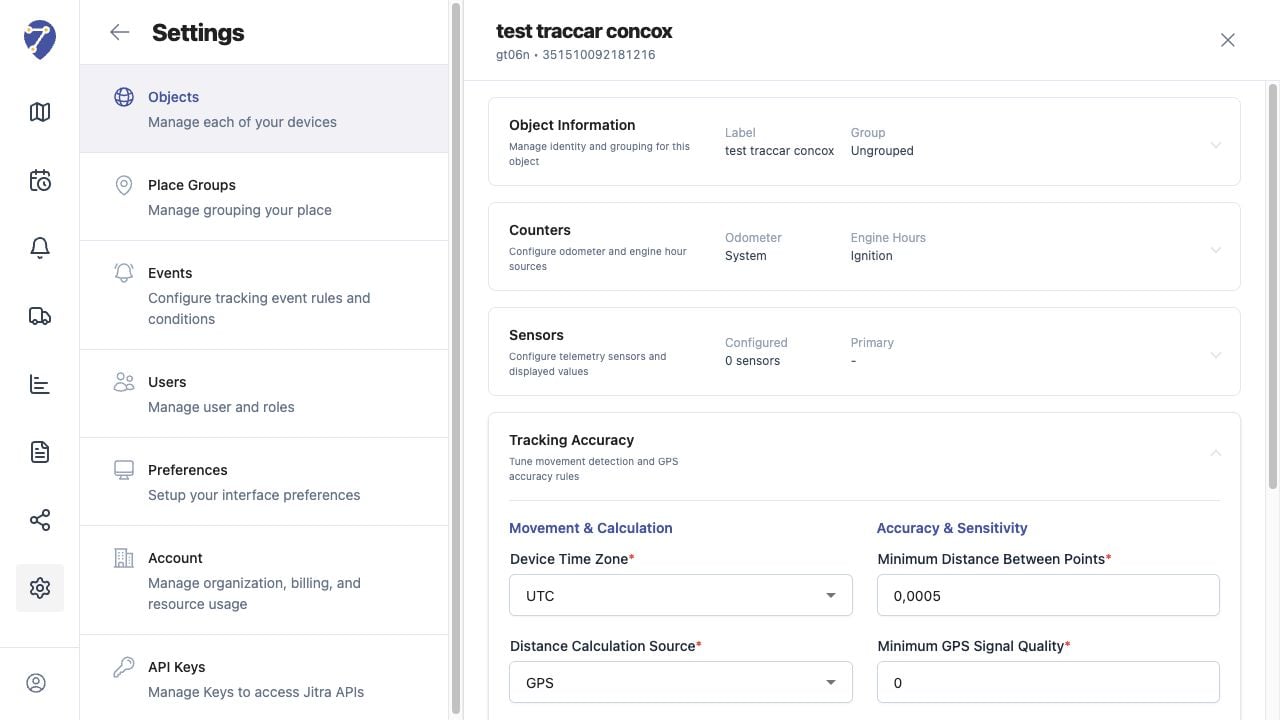
Object Location Is Inaccurate screen on Jitra staging

Reviewing the Result

Confirm the saved or displayed information matches the intended Object, users, period, and Organization workflow.

If the Issue Continues

Review required fields, access permissions, available data, and Organization limits. Contact an Organization administrator or Jitra support when the required control is unavailable.