
Geofence-dependent Events evaluate an Object’s position in relation to one or more configured geofences.

Choosing the Event Type

Use Entrance Geofence when an Event should be created as an Object enters a selected boundary. Use Exit Geofence when the Event should be created as it leaves.

Selecting Objects and Geofences

In Event Setting, select the Objects to monitor. In Triggers Setting, select the required Geofences and set Cooldown after last event.
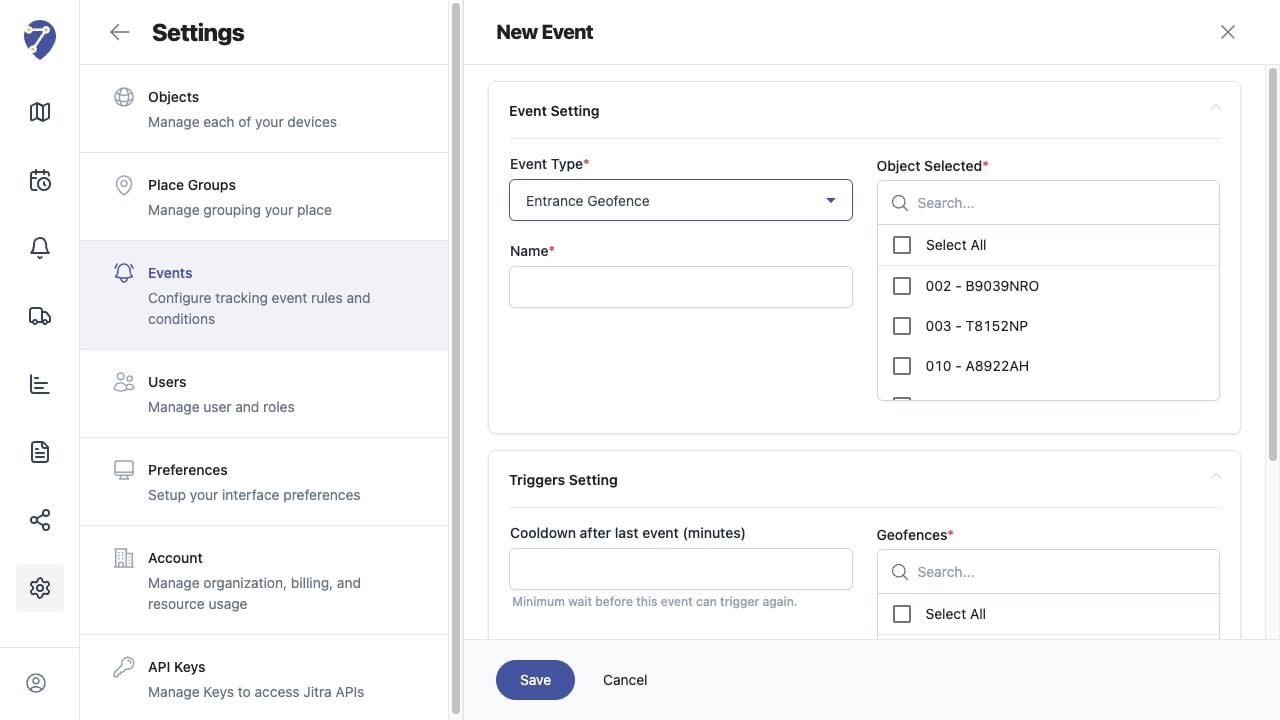
Configuring Geofence-Dependent Events in Jitra staging

Using Geofences with Other Event Types

Some types, such as Over Speed, include Depending on geofences. Select Inside or Outside when the threshold should only apply in relation to selected geofences, or Off when geofences should not affect the rule.

Checking the Result

Confirm the Object sends valid positions around the boundary and that the correct geofence is selected. Position accuracy and sparse tracking intervals can affect when a crossing is detected.