
Eco Driving evaluates driving behavior using rules and penalty points defined in an Eco Driving Profile.

Opening Eco Driving

Open Analytics, select Eco Driving, then choose Overview, Vehicles, or Profile.
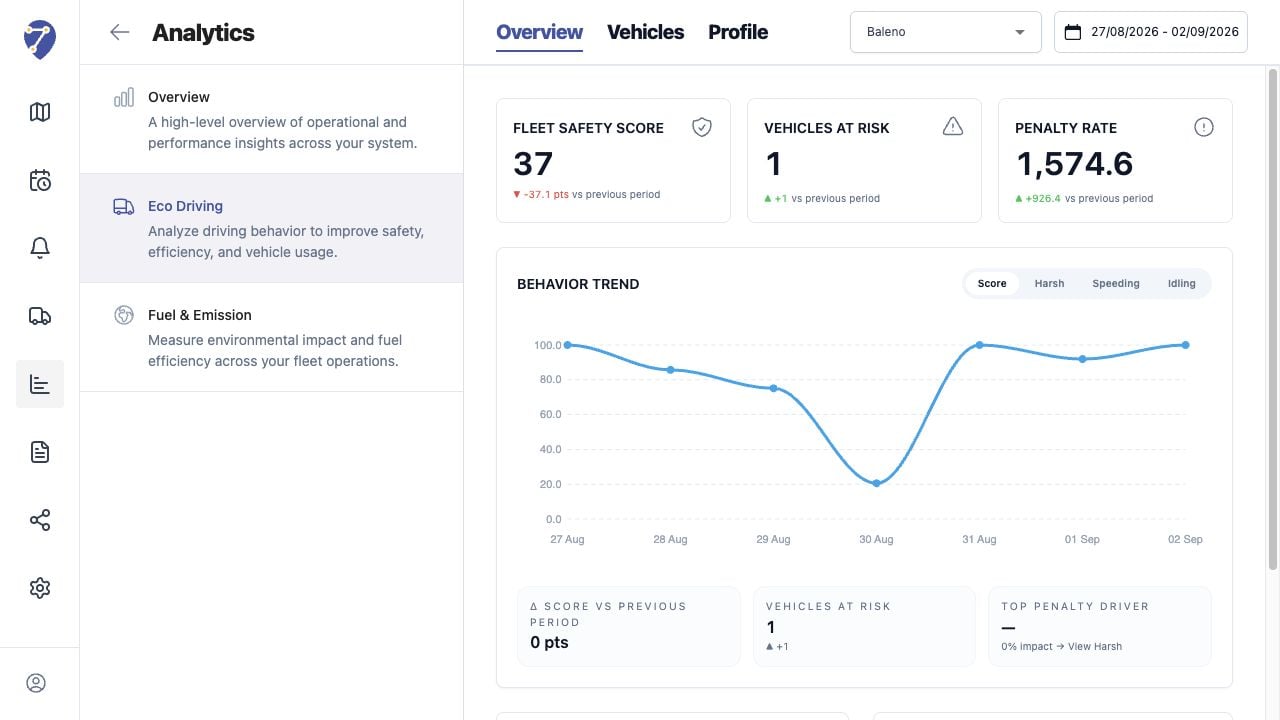
Understanding Eco Driving Analytics in Jitra staging

Behaviors Evaluated

  • Speeding
  • Harsh Acceleration
  • Harsh Braking
  • Harsh Cornering
  • Excessive Idling

How Scoring Works

The selected Profile defines thresholds, minimum durations, penalty points, and normalization. Jitra applies those settings to assigned Objects and the loaded period.

Overview and Vehicles

Overview emphasizes fleet-level score, risk, trend, and penalty contribution. Vehicles provides sortable per-Object counts and normalized totals.

Important Context

Eco Driving results depend on valid movement data and the selected Profile. A score should be compared only when the Profile, Object assignment, and period are understood.